


Introduction
Does your business need to offer flexible, personalised installment payment plans to customers — but setting them up in Stripe one by one is painfully slow and technically complicated?
Whether you’re a school, a healthcare provider, a software company, a law firm, or any business that collects large payments over time — creating customised installment payment plans manually in Stripe is a frustrating, error-prone process. Each plan requires navigating multiple screens, calculating per-payment amounts manually, managing cancellation dates, and configuring recurring prices from scratch for every single customer.
In this guide, you’ll learn how to bulk create flexible, customisable, and personalised Stripe installment payment plans from a spreadsheet — directly from your Stripe Dashboard, with automatic amount splitting, auto-computed cancellation dates, real-time progress tracking, and zero coding required.
Turn your spreadsheets into fully automated Stripe installment payment plans — instantly and at scale.
Why Manually Creating Installment Payment Plans in Stripe Is So Difficult
Stripe is built for recurring subscriptions — not installment payment plans. There is no native installment plan feature in the Stripe Dashboard, leaving businesses to build complex workarounds for every customer they want to offer split payment to.
- ⚠️ No native installment plan feature — Stripe has no built-in way to split a total amount into a fixed number of recurring payments
- ❌ You must manually create a Product, a recurring Price, and a Subscription for every single customer
- ❌ Per-payment amounts must be calculated by hand — and rounded correctly for each plan
- ❌ Cancellation dates must be set manually for each subscription to stop after the final payment
- ❌ No flexibility — every customer requires the same manual configuration process regardless of their individual plan
- ❌ No way to bulk create personalised plans — one customer at a time, every time
- ❌ Requires API knowledge or a developer to automate anything at scale
- ❌ Platform migrations require recreating all historical installment plans one by one
- ❌ No audit trail — no central record of what was created, what failed, or what needs fixing
The Smarter Way: Use Stripe Installment Payment Plans App
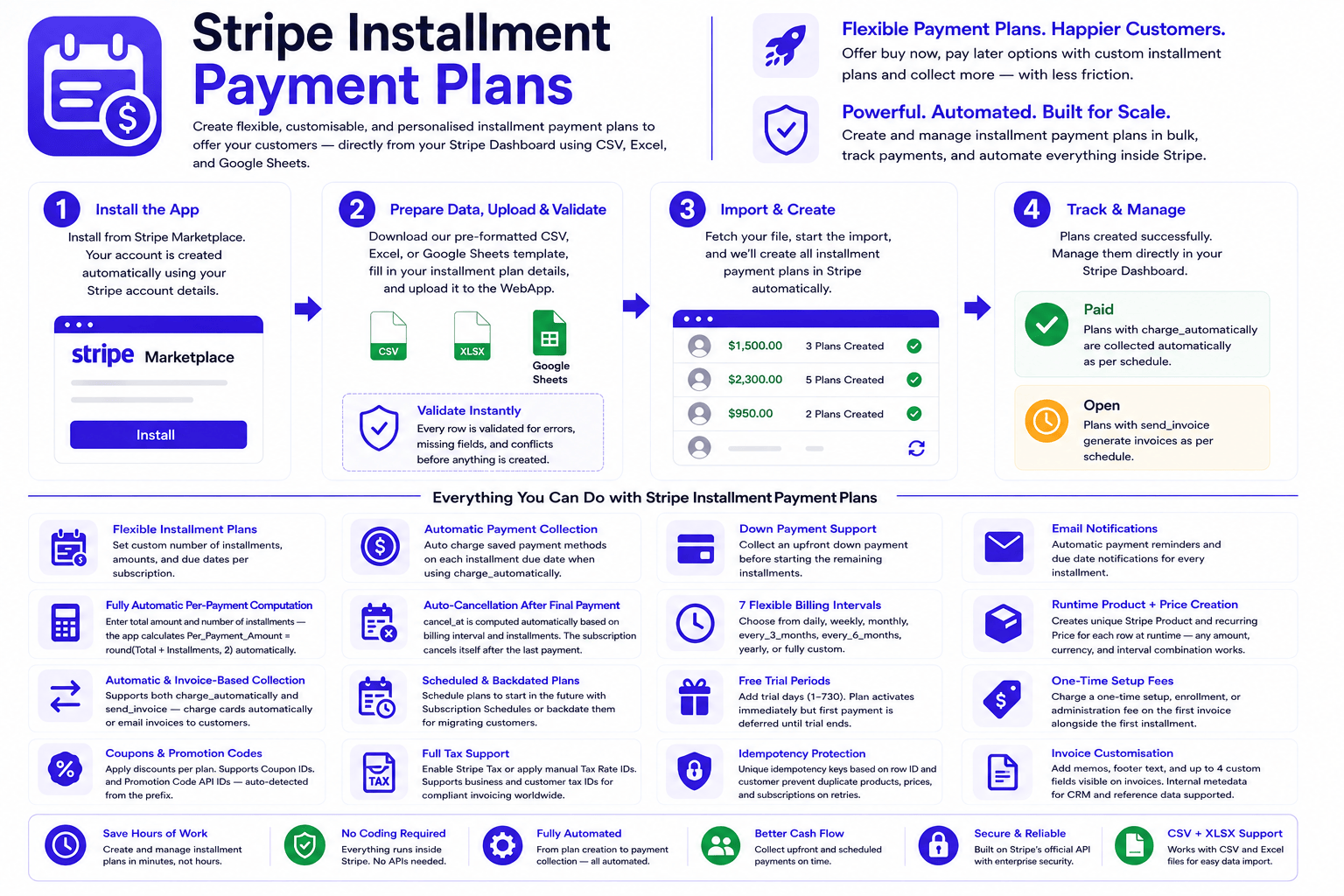
Stripe Installment Payment Plans app is built for businesses, schools, healthcare providers, agencies, and finance teams who need to create flexible, customisable, and personalised installment payment plans for their customers at scale — without manual data entry, complex price configuration, API knowledge, or developer involvement.
The app lets you create flexible, customisable, and personalised installment payment plans to offer your customers — directly from your Stripe Dashboard using CSV, Excel, and Google Sheets. Easily split any total amount into recurring payments and create installment plans for as many customers as you need. Set the total, choose the number of payments and billing interval — the app handles the rest automatically.
How It Works:
- Install the App – Directly from the Stripe App Marketplace or visit our website.
- Download the Template – Get the pre-formatted CSV, Excel, or Google Sheet sample file from the WebApp.
- Fill In Your Data – Add each customer’s Stripe Customer ID, total amount, number of installments, billing interval, and currency — one row per plan. Customise each row independently for fully personalised plans.
- Upload & Validate – Upload your file to the WebApp. Every row is validated for errors before anything is sent to Stripe.
- Create in Bulk – Click one button inside your Stripe Dashboard app and all installment plans are created simultaneously.
- Auto-Cancel After Final Payment – Every subscription is set to cancel automatically after the last installment — no manual action ever required.
- Track & Fix – Watch progress in real time. Any failures are logged with exact error messages for easy re-processing.
Key Features & Benefits
⚡ Speed & Efficiency
- ✅ Bulk installment plan creation — create hundreds of flexible, personalised plans in under 10 minutes
- ✅ CSV, Excel, and Google Sheets — use whatever tool your team is comfortable with
- ✅ Save hours of manual work — what used to take a full day now takes under 10 minutes
- ✅ One file upload replaces hundreds of manual Stripe configurations
🎨 Flexible, Customisable & Personalised
- ✅ Fully personalised per row — every customer gets their own customised plan with a different total, interval, billing method, discounts, and fees
- ✅ 6 preset billing intervals + custom — daily, weekly, monthly, quarterly, bi-annual, yearly, or any custom frequency
- ✅ Per-customer setup fees — different enrollment or administration fees per customer in the same upload
- ✅ Per-customer discounts — apply different coupons or promotion codes per plan
- ✅ Per-customer tax settings — different tax rates, tax IDs, and invoicing compliance per customer
🔢 Automatic Amount Calculation
- ✅ Per-payment amount auto-computed — enter the total and number of installments; the app splits it automatically
- ✅ cancel_at auto-computed — subscriptions end themselves after the final payment; no manual cancellation date needed
- ✅ Runtime Product + Price creation — no pre-existing Price IDs needed; the app creates a unique Stripe Product and Price for each row
- ✅ Zero-decimal currency support — JPY, KRW, BIF and all zero-decimal currencies handled automatically
🛡️ Accuracy & Reliability
- ✅ Full pre-import validation — every row checked for errors before anything touches Stripe
- ✅ Clear row-by-row error messages — exact issues identified with customer ID shown in every error
- ✅ No partial imports — conflicting fields, wrong formats, and missing data caught upfront
- ✅ Full audit trail — every record, every result, every failure logged in WebApp for review
🔧 Flexibility & Power
- ✅ Both collection methods — charge_automatically and send_invoice supported
- ✅ Setup fees — add a one-time enrollment or administration fee on the first invoice
- ✅ Coupons & promotion codes — apply discounts per plan
- ✅ Tax Rate & Automatic Tax — full Stripe tax compliance per plan
- ✅ B2B invoicing — customer tax IDs (VAT, GST, ABN, EIN), account tax IDs, custom fields, invoice memo, and footer
- ✅ Metadata auto-populated — installment plan details automatically written to Stripe subscription metadata
- ✅ Billing cycle anchor — force all payments to fall on the same day of the month
- ✅ Backdate support — migrate existing customers with historical start dates preserved
👨💻 Ease of Use (No Technical Skills Required)
- ✅ No coding required — if you can fill in a spreadsheet, you can use this app
- ✅ No API keys to configure — runs directly inside your Stripe Dashboard
- ✅ No developers needed — anyone on your team can run bulk imports
- ✅ Fix and re-process failures — correct failed rows and re-import without re-uploading the entire file
Installment Plan Features Supported
🎨 Flexible, Customisable & Personalised Plans Per Customer
Every row in your file is fully independent. Each customer gets their own personalised installment plan — a different total amount, a different number of payments, a different billing interval, a different collection method, different discounts, different setup fees, and different tax settings. You can create 500 completely customised plans in one upload, each tailored to the individual customer’s agreement.
🔢 Automatic Per-Payment Amount Splitting
You enter the Total Amount and Number of Installments. The app automatically computes the Per Payment Amount as round(Total_Amount ÷ Number_of_Installments, 2) and uses it as the recurring charge for each billing cycle. No manual calculation required — ever.
⏹️ Auto-Cancel After Final Installment
The subscription’s cancel_at date is computed automatically: billing_start + (interval × number_of_installments). The subscription cancels itself after the last payment — no manual action, no reminders, no risk of overcharging a customer who has completed their plan.
🔄 6 Preset + Custom Billing Intervals
Choose from daily, weekly, monthly, every 3 months, every 6 months, or yearly billing. Or use the custom interval option to set any frequency Stripe supports — every 2 weeks, every 4 months, every 10 days — with a custom period and count per row. Each customer in the same file can have a completely different billing interval.
📅 Immediate & Scheduled Plans
Start installment plans right now or schedule them for any future date. Scheduled plans use Stripe’s Subscription Schedules — status stays not_started until the start date arrives and then activates automatically.
🔄 Free Trial Periods
Add trial days (1–730) to any installment plan. Customers get free access during the trial period, then billing starts automatically. The cancel_at computation accounts for the trial so the plan still runs for the full number of installments after the trial ends.
💰 One-Time Setup Fees
Add a one-time setup, enrollment, or administration fee to the first invoice for any plan. Currency is taken automatically from Billing_Currency. Each customer can have a different fee amount and a custom line item label — fully personalised per row.
🏷️ Coupons & Promotion Codes
Apply Stripe coupons or promotion code API IDs per installment plan. The app auto-detects which type you’re using based on the ID prefix — one field handles both. Apply different discounts to different customers in the same file.
📊 Tax Rate & Automatic Tax
Apply manual Tax Rates (txr_) or enable Stripe Tax automatic calculation per plan. Supports customer tax IDs (VAT, ABN, GST, EIN) for B2B invoicing compliance in any country.
📆 Billing Cycle Anchor
Force all installment payments to be billed on the same day every month. Prorated charges for short first periods are handled automatically by Stripe.
⏮️ Backdate Installment Plans
Backdate plan start dates for customers migrating to Stripe. Stripe generates a prorated first invoice covering the period from the past date to today — preserving complete billing history.
📋 Invoice Customisation
Add invoice memo, custom footer, up to 4 custom fields visible on invoice PDFs, and unlimited internal metadata per plan. Full control over what your customers see on every installment invoice.
🤖 Auto-Populated Metadata
Every installment plan subscription has its plan structure automatically written to Stripe metadata: Payment Type, Total Amount, Number of Installments, Per Payment Amount, Billing Interval, and Currency — visible in your Stripe Dashboard without any additional setup.
🔁 Fix & Re-Process Failures
Any failed plans are logged with the exact Stripe error message. Fix the issue and re-process just the failed rows directly from the WebApp without re-uploading the entire file.
Who Uses Stripe Installment Payment Plans App?
- ✅ Schools & Universities — offer flexible tuition installment plans personalised to each student’s program and payment capacity
- ✅ Healthcare Providers — create customised payment plans for medical bills, procedures, and treatment packages per patient
- ✅ SaaS & Software Companies — allow annual contract customers to pay in flexible monthly or quarterly installments
- ✅ Law Firms & Professional Services — set up personalised fixed-term recurring billing for retainer and service agreements
- ✅ Gyms & Fitness Studios — collect membership fees in flexible installments over a fixed plan period
- ✅ Agencies & Consultancies — bill project retainers in equal monthly payments with automatic end dates
- ✅ E-commerce & High-Ticket Sales — offer flexible buy-now-pay-later style installment plans for large purchases
- ✅ Finance Teams — manage large batches of customised customer payment plans without developer involvement
- ✅ Platform Migrations — move existing installment plan customers from another billing platform to Stripe with billing history preserved
Security First: Your Data Is Safe
- ✅ Secure authentication — industry-standard authorization flow
- 🔐 Strong SSL encryption — all data transfers are encrypted end to end
- ✅ Official Stripe API — built on Stripe’s trusted and verified infrastructure
- ✅ Verified Stripe Marketplace App — reviewed and approved by Stripe
Your customer and payment information are always encrypted and secured using industry best practices.
Before vs After: Manual Creation vs Bulk Import
| Action | Manual Stripe Dashboard | Stripe Installment Payment Plans App |
|---|---|---|
| Create 100 installment plans | Hours of manual Product, Price, and Subscription creation | Done in under 10 minutes from a spreadsheet |
| Per-payment amount calculation | Manual division — errors guaranteed at scale | Auto-computed from Total_Amount ÷ Installments |
| Auto-cancel after final payment | Must manually set cancel_at for every subscription | Computed automatically — subscription ends itself |
| Flexible & personalised plans per customer | Must manually reconfigure every single customer separately | Every row is independent — fully customised per customer |
| Custom billing intervals | Must manually configure Stripe Price for each | One column in the spreadsheet — daily to custom |
| Error prevention | None — mistakes happen undetected | Full pre-import validation catches all errors |
| Schedule future plans in bulk | Must configure each one individually | Set start date per row — all scheduled at once |
| Apply setup fees per customer | Create invoice items manually for each | One column in the spreadsheet — different fee per row |
| Technical skill needed | High — requires API knowledge or developer | None — fill in a spreadsheet and upload |
| Audit trail | No central record of what was created | Full WebApp record — every result logged |
Real-World Use Cases
🎓 Use Case 1: School Tuition Installment Plans
Challenge: A school needs to set up flexible monthly tuition installment plans for 200 new students — each paying a different total amount based on their program, split into 10 monthly payments, with some students receiving personalised enrollment fee waivers.
Solution: Prepare a spreadsheet with each student’s Stripe Customer ID, total tuition amount, 10 monthly installments, and individual setup fees where applicable. Upload once and all 200 personalised installment plans are created simultaneously, each auto-cancelling after the 10th payment.
Result: 200 flexible, customised installment plans created in under 15 minutes. Per-payment amounts calculated automatically. Zero manual Stripe configuration required.
🏥 Use Case 2: Healthcare Patient Payment Plans
Challenge: A healthcare clinic needs to offer personalised payment plans for 50 patients with outstanding medical bills — each plan covering a different total amount split into 6 monthly installments, with a customised enrollment fee per patient.
Solution: Finance team prepares the patient spreadsheet with each patient’s Customer ID, total bill, 6 installments, monthly billing, and the personalised enrollment fee per patient. One upload creates all 50 customised plans with the correct amounts and setup fees.
Result: Patient billing setup reduced from a full day of manual Stripe work to 20 minutes of spreadsheet preparation and one upload.
🏢 Use Case 3: Agency Retainer Billing
Challenge: An agency bills 40 clients on 12-month project retainers. Each client has a different contract value and the agency needs flexible equal monthly payments that stop automatically at month 12.
Solution: Account managers fill in the spreadsheet at contract signing. Finance uploads once — all 40 personalised retainer installment plans created with auto-cancel at month 12. No developer involvement.
Result: Retainer billing fully automated. Subscriptions end exactly when contracts end. No manual cancellation chasing required.
💼 Use Case 4: High-Ticket B2B Sales — Quarterly Installments
Challenge: An enterprise software company closes 30 annual deals. Each customer pays their total contract value in 4 equal quarterly installments. Sales team needs all flexible plans live at the correct contract start dates.
Solution: Sales team fills in the contract spreadsheet as deals close. Finance uploads once — all 30 personalised plans scheduled with the correct start dates and quarterly billing, each running for exactly 4 installments before auto-cancelling.
Result: Zero developer involvement. All installment plans live at the correct contract dates. Finance team handles it entirely from a spreadsheet.
Ready to Get Started?
- ✅ Install directly from Stripe Marketplace — takes under 1 minute
- ✅ Download the sample template — pre-formatted and ready to fill in
- ✅ Create your first batch of flexible installment plans today — see results immediately
✅ Trusted by businesses globally · Verified Stripe Marketplace App · 5⭐ User Rating
Frequently Asked Questions
- Q: Do I need to create a Stripe Product and Price manually for each installment plan?
- A: No. The app creates a unique Stripe Product and Price at runtime for every row in your file. You never need to set up any Price IDs in advance. Just enter the total amount, number of installments, billing interval, and currency — the app handles everything else automatically.
- Q: Can each customer have a completely different installment plan?
- A: Yes. Every row in your file is fully independent and customisable. Each customer can have a different total amount, a different number of installments, a different billing interval, a different collection method, a different setup fee, and different discounts — all in the same upload. Plans are fully personalised per customer.
- Q: How does the subscription know when to stop charging?
- A: The app automatically computes the cancel_at date for every plan using the formula: billing_start + (interval × number_of_installments). The subscription cancels itself after the final payment — no manual cancellation action is ever required.
- Q: What billing intervals are supported?
- A: Six preset cycles are supported out of the box: daily, weekly, monthly, every 3 months, every 6 months, and yearly. You can also use a custom interval to set any billing frequency Stripe supports — for example, every 2 weeks, every 4 months, or every 10 days — using the Custom_Billing_Period and Custom_Billing_Count fields. Each customer in the same file can use a completely different billing interval.
- Q: Do I need to calculate the per-payment amount myself?
- A: No. You only enter the Total_Amount and Number_of_Installments. The WebApp automatically computes the per-payment amount as round(Total_Amount ÷ Number_of_Installments, 2) and uses it as the recurring charge amount. You never enter Per_Payment_Amount in the CSV.
- Q: Can I schedule installment plans to start on a future date?
- A: Yes. Enter a future date in the Start_Date column and the app creates a Stripe Subscription Schedule. The plan status stays not_started until that date and then activates automatically.
- Q: Can I add a setup fee to the first installment?
- A: Yes. Enter the fee amount in the Setup_Fee column. The app creates an invoice item for this amount before the subscription starts — it appears as a separate line item on the first invoice alongside the first installment payment. Each customer can have a different fee amount and a custom line item label.
- Q: What happens if some plans fail to create?
- A: Failed plans are logged in the WebApp with the exact Stripe error message. You can fix the issue and re-process just the failed rows without re-uploading the entire file.
- Q: What currencies are supported?
- A: 134 currencies are supported. Zero-decimal currencies (such as JPY, KRW, BIF, XAF) are detected and handled automatically — the app skips the ×100 multiplication so the correct amount is always charged.
- Q: Can I use installment plans for B2B invoicing?
- A: Yes. The app supports customer tax IDs (VAT, GST, ABN, EIN), account tax IDs, invoice memos, custom fields on invoice PDFs, and custom footers — everything needed for compliant B2B invoicing across any country.
- Q: Does the app support both automatic charging and invoice-based collection?
- A: Yes. Both charge_automatically and send_invoice are fully supported. Use charge_automatically to silently charge a saved card on each billing date. Use send_invoice to email the customer an invoice for each installment that they pay manually. You can mix both methods in the same file — different customers can use different collection methods.
- Q: Do I need technical skills or API knowledge to use the app?
- A: No. The app runs entirely inside your Stripe Dashboard. If you can fill in a spreadsheet, you can use this app. No API keys, no coding, no developers required.
What Our Clients Say
Honestly didn’t expect it to be this straightforward. We sell high-ticket furniture and customers always ask about splitting payments. Used to do it manually in Stripe — create a product, create a price, create a subscription, calculate the monthly amount myself. For every customer. This app just handles all of it from a CSV. Put in the total and number of payments, upload, done. Plans even stop themselves after the last payment which I didn’t realise I needed until it happened.
— Marcus Delgado
Saves our finance team hours every single intake. 150+ students, different totals, different installment counts, some starting on different dates — one file, everything live in Stripe within minutes. Three intakes in, zero issues.
— Danielle Kowalski
We bill clients for large project fees and offer them the option to pay in stages. Before this app someone on our team had to manually go into Stripe and cancel subscriptions after the final payment — more than once we forgot and a client got charged an extra month. The automatic cancellation alone was worth it for us. We also use the setup fee field to charge a deposit on the first invoice alongside the first installment, which works exactly as you’d expect. Had one question during setup and support got back to me the same day.
— Simone Tran
Conclusion
Creating flexible, customisable, and personalised Stripe installment payment plans manually — building a Product, configuring a Price, calculating the per-payment amount, setting a cancel_at date, and creating a Subscription for every single customer — doesn’t have to be your workflow anymore.
Stripe Installment Payment Plans app transforms what used to take hours of repetitive Stripe configuration into a single file upload that completes in minutes. Easily split any total amount into recurring payments and create installment plans for as many customers as you need — each one fully personalised. Set the total, choose the number of payments and billing interval — the app handles the rest automatically.
Instead of manually calculating how much each customer should pay per billing cycle, navigating through Stripe product and price creation screens for every row, and setting cancellation dates by hand — you simply fill in a spreadsheet and upload. Per-payment amounts are computed automatically. Stripe Products and Prices are created at runtime. cancel_at is set for you. Every subscription ends itself after the final payment. And because every row is independent, each customer gets a completely customised plan in the same upload.
Whether you’re creating 10 installment plans or 10,000, the process is the same — fast, accurate, and fully audited. Schools set up flexible semester tuition plans in minutes. Healthcare providers offer personalised patient payment plans without developer support. Agencies automate retainer billing with built-in end dates. Enterprise sales teams schedule quarterly payment plans that activate at the right contract dates.
The app supports everything you need: immediate and scheduled plans, 6 preset billing intervals plus custom, free trials, billing cycle anchors, backdating, setup fees, coupons, tax rates, B2B invoicing compliance, and full invoice customisation. And because it’s built on Stripe’s official API and verified by Stripe Marketplace, your data is always secure.
No coding. No API keys. No scripts. No developers. No manual amount calculations. No forgotten cancellation dates. Anyone on your team can bulk create flexible, customisable, and personalised Stripe installment payment plans from a spreadsheet in under 10 minutes.
Ready to stop creating Stripe installment plans one by one?
Get started with Stripe Installment Payment Plans app now and offer flexible, personalised split payment plans to your customers at any scale.


