


Introduction
Are you tired of manually downloading Stripe invoice PDFs, receipts, and payment links one by one?
If you’re managing dozens, hundreds, or thousands of Stripe invoices, doing it manually is exhausting. You open each invoice, click download, save the file, repeat — endlessly. It’s time-consuming, error-prone, and an inefficient use of your team’s time.
In this guide, you’ll learn how to bulk export Stripe invoice PDFs, payment receipts, and live payment links — all directly from your Stripe Dashboard in one click, with no manual work, no coding, and no CSV exports required.
Turn your Stripe Dashboard into a powerful invoice document management hub — instantly.
Why Manually Downloading Stripe Invoice Docs Wastes Time
Stripe’s default dashboard requires you to open each invoice individually to download its PDF or copy its receipt link — a nightmare when you have hundreds of invoices to manage.
- ⚠️ No bulk download — you must click each invoice manually
- ❌ No way to export receipts in bulk — copy and paste one by one
- ❌ No batch export for payment links — manual retrieval every time
- ❌ Sending invoice docs to clients requires repetitive manual work
- ❌ Accounting and compliance document gathering takes hours
The Smarter Way: Use Stripe Bulk Invoice Docs Exporter Pro
Stripe Bulk Invoice Docs Exporter Pro is built for businesses, accountants, finance teams, and agencies that need to export Stripe invoice documents in bulk — without leaving the Stripe Dashboard.
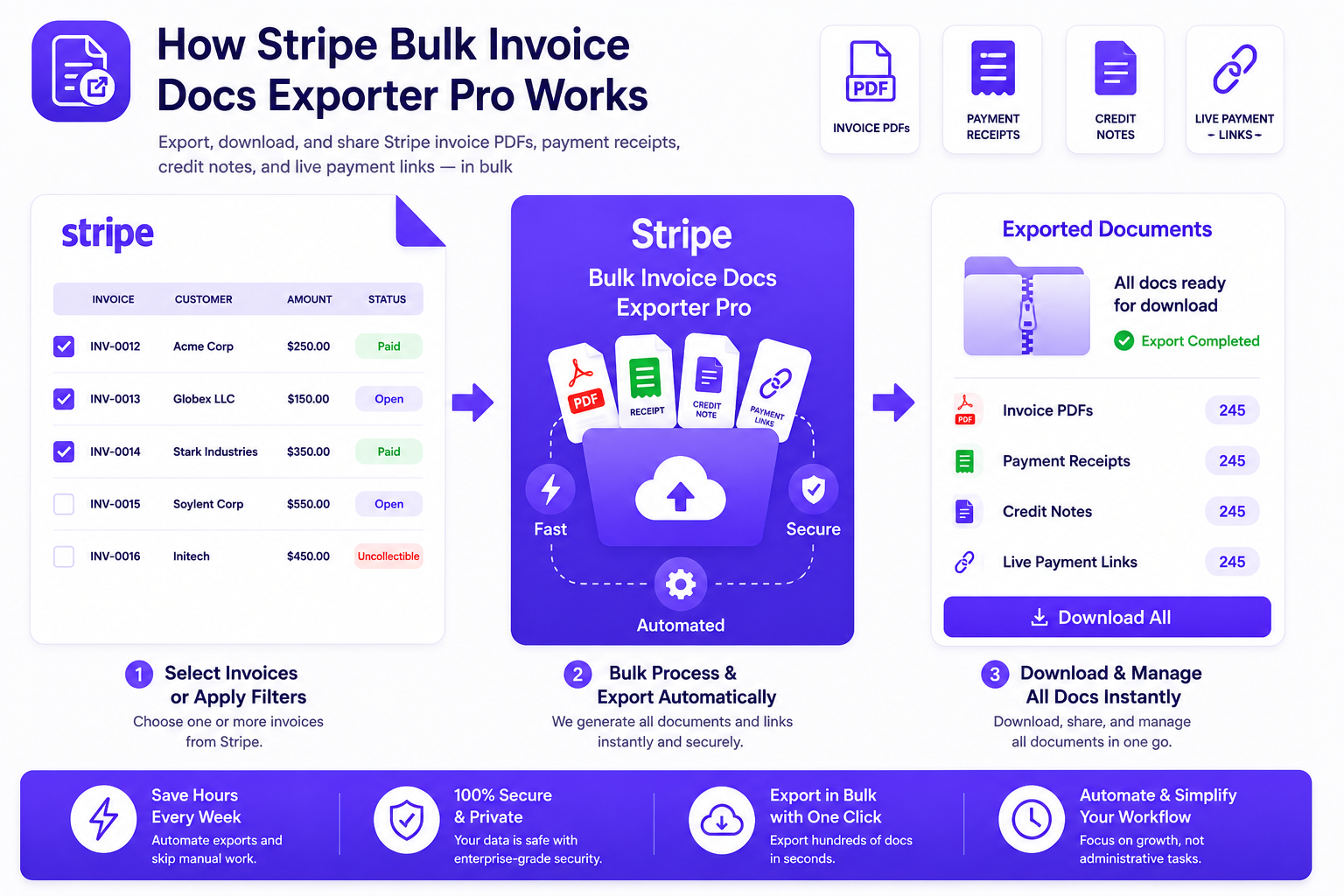
How It Works:
- Install the App – Directly from the Stripe App Marketplace or visit our website.
- Choose Your Export Method – Select invoices manually, by customer, by status, by date range, or by invoice ID.
- Export in Bulk – The app fetches invoice PDFs, payment receipts, and live payment links for all selected invoices automatically.
- Access in WebApp – Download, manage, and share all exported invoice documents from your webapp dashboard anytime.
Key Features & Benefits
⚡ Speed & Efficiency
- ✅ Bulk export invoices — export hundreds of invoice docs in one go
- ✅ Multiple export methods — by selection, customer, status, date range, or ID
- ✅ Save hours weekly — eliminate manual invoice document downloads forever
- ✅ Live payment links — instantly access shareable payment links for any invoice
🛡️ Accuracy & Reliability
- ✅ 100% accurate data — directly from Stripe’s official API
- ✅ No missed invoices — automated bulk processing handles all selected records
- ✅ Draft invoice protection — drafts are automatically excluded from exports
- ✅ Duplicate prevention — smart detection avoids exporting the same invoice twice
🔧 Flexibility & Power
- ✅ 6 export methods — selected invoices, by customer, by status, by date range, by customer ID, or by invoice ID
- ✅ Filter by status — export open, paid, uncollectible, void, or all invoices
- ✅ Filter by date range — export invoices from any time period with timezone support
- ✅ Multi-customer bulk export — select multiple customers and export all their invoices at once
👨💻 Ease of Use (No Technical Skills Required)
- ✅ No coding required — simple point-and-click interface inside Stripe Dashboard
- ✅ Works inside Stripe — no need to leave your Stripe Dashboard
- ✅ Setup in under 1 minute — start exporting immediately
- ✅ Credits never expire — buy credits and use them whenever you need
- ✅ Download anytime — access exported documents in webapp without spending credits
Export Methods Available
📋 Export Selected Invoices
Browse your Stripe invoice list, select one or more invoices, and export their PDFs, receipts, and live payment links in one go. Perfect for targeted exports when you know exactly which invoices you need.
👥 Export Invoices by Selected Customers
Select multiple customers from your Stripe customer list and export all their invoice documents at once. Ideal for account managers and agencies handling multiple clients.
📊 Export Invoices by Status
Filter invoices by status — open, paid, uncollectible, void, or all — and export them all at once. Perfect for accounting reconciliation and compliance document gathering.
📅 Export Invoices by Date Range
Select a date range and invoice status to export all matching invoice documents. Supports timezone selection to match your Stripe Dashboard timezone for accurate results.
🔍 Export Invoices by Customer ID
Enter a specific customer ID and export all their invoice PDFs, receipts, and payment links in bulk. Great for quick customer-specific document exports.
🔢 Export Invoice by ID
Enter a specific invoice ID and instantly export its PDF, receipt, and live payment link. Perfect for one-off invoice document requests.
Who Uses Stripe Bulk Invoice Docs Exporter Pro?
- ✅ Finance & Accounting Teams — bulk export invoices for reconciliation, audits, and compliance
- ✅ Businesses — send invoice PDFs and receipts to customers in bulk
- ✅ Agencies — export invoice documents for multiple clients at once
- ✅ E-commerce Stores — manage and download bulk purchase receipts
- ✅ SaaS Companies — export subscription invoice PDFs for all customers
- ✅ Freelancers — quickly download and share invoice documents with clients
- ✅ Customer Support Teams — retrieve and resend invoice documents instantly
- ✅ Operations Teams — streamline invoice document management workflows
Security First: Your Data Is Safe
- ✅ Secure authentication — industry-standard authorization flow
- 🔐 Strong SSL encryption — all data transfers are encrypted
- ✅ Official Stripe API — built on Stripe’s trusted infrastructure
- ✅ Verified Stripe Marketplace App — reviewed and approved by Stripe
We take your privacy seriously. Your payment and customer information are always encrypted and secured using industry best practices.
Pricing — Credits That Never Expire
- ✅ Free credits — explore and try the app at no cost
- ✅ Credits never expire — buy once, use whenever you need
- ✅ Download unlimited times — re-download exported documents anytime without spending credits
- ✅ Only pay for exports — credits only deducted when exporting new invoice data
No monthly subscription required. Pay only for what you export.
Before vs After: Manual Downloads vs Bulk Export
| Action | Manual Invoice Downloads | Bulk Invoice Docs Exporter Pro |
|---|---|---|
| Export 100 invoice PDFs | 1-2 hours of clicking | Done in minutes automatically |
| Get payment receipts | Open each invoice manually | Bulk exported automatically |
| Live payment links | Copy one by one from each invoice | All exported in one batch |
| Filter by date range | Manual search and download | Date range filter with one click |
| Filter by customer | Search customer, find invoices, download each | Select customer, export all at once |
| Filter by status | Filter in dashboard, download one by one | Status filter + bulk export instantly |
| Technical skill needed | Moderate (navigate Stripe, find downloads) | None (works inside Stripe Dashboard) |
| Scalability | Impossible at high volumes | Handles unlimited invoices effortlessly |
Real-World Use Cases
📊 Use Case 1: Finance Team Monthly Reconciliation
Challenge: Finance team needs to download all paid invoices from the previous month for reconciliation but manually downloading hundreds of PDFs takes half a day.
Solution: Use the Date Range export with “Paid” status filter to export all paid invoices from the previous month in minutes.
Result: Monthly reconciliation document gathering reduced from 4 hours to under 10 minutes.
🏢 Use Case 2: Agency Client Invoice Delivery
Challenge: Marketing agency needs to send all invoice PDFs and receipts to 20 clients at the end of each month. Each client has multiple invoices.
Solution: Use the Selected Customers export to bulk export all invoice documents for multiple clients at once.
Result: Client invoice delivery automated. Eliminates 3 hours of monthly manual work.
🔍 Use Case 3: Customer Support Invoice Resend
Challenge: Customer requests a copy of all their invoice PDFs and receipts. Support agent has to open each invoice and download it manually.
Solution: Use the Customer ID export to instantly export all invoice documents for that specific customer.
Result: Customer invoice requests handled in seconds instead of 30+ minutes.
📈 Use Case 4: Year-End Compliance Document Gathering
Challenge: Business needs to compile all invoice PDFs for the entire year for their accountant. Thousands of invoices across the year.
Solution: Use Date Range export with “All” status to export every invoice document from the full year at once.
Result: Full year invoice documentation compiled in minutes instead of days.
Ready to Get Started?
- ✅ Install directly from Stripe Marketplace — takes under 1 minute
- ✅ Free credits — start exporting today at no cost
- ✅ Export your first batch of invoices today — see results immediately
✅ Trusted by businesses globally · Verified Stripe Marketplace App · 5⭐ User Rating
Frequently Asked Questions
- Q: How many invoices can I export at once?
- A: There is no limit—all matching invoices are automatically exported based on your selected filters, regardless of volume.
- Q: What documents does the app export?
- A: The app exports three document types for each invoice: the invoice PDF, the payment receipt PDF (for paid invoices), and the live payment link. All are accessible from your webapp dashboard after export.
- Q: Does exporting the same invoice again cost credits?
- A: No. Credits are only deducted when you export new invoice data for the first time. Re-downloading already exported invoice documents from the webapp is completely free and unlimited.
- Q: Do my credits expire?
- A: No. Your credits never expire. Buy them once and use them whenever you need, at your own pace.
- Q: Can I filter invoices by date range?
- A: Yes. The Date Range export lets you select a start date, end date, invoice status, and timezone to export exactly the invoices you need. The timezone selector ensures results match what you see in your Stripe Dashboard.
- Q: Are draft invoices included in exports?
- A: No. Draft invoices are automatically excluded from all exports. Only finalized invoices (open, paid, uncollectible, void) are exported.
- Q: Can I export invoices for multiple customers at once?
- A: Yes. The Selected Customers export lets you select multiple customers from your Stripe customer list and export all their invoice documents in one batch.
- Q: Does this work with Stripe test mode?
- A: Yes. The app works in both Stripe live mode and test mode, making it easy to test the export functionality before using it with real invoice data.
- Q: Do I need technical skills to use the app?
- A: No. The app works entirely inside your Stripe Dashboard with a simple point-and-click interface. No coding, no API keys, no technical expertise required.
- Q: How do I access exported invoice documents?
- A: After exporting, all invoice documents are available in your webapp dashboard at any time. You can download PDFs, copy payment links, and manage all exported documents from one place.
What Our Clients Say
“The app is very intuitive and easy to use. If you have any problems, they can help you quickly.”
— Harvey, Random Vinyl Club
“Our accounting team loves it! All invoices, receipts, and payment links are neatly organized and easy to access. What used to take days now gets done in minutes.”
— Rin Otori
“Scaling was a nightmare before. With hundreds of invoices every month, manual exports caused errors and delays. This app solved it instantly.”
— John Zahra
Conclusion
Manually downloading Stripe invoice PDFs, receipts, and payment links one by one doesn’t have to be part of your workflow anymore. Stripe Bulk Invoice Docs Exporter Pro transforms what used to take hours of repetitive clicking into an automated bulk export that runs in minutes.
Instead of opening each invoice individually, downloading the PDF, copying the receipt link, and repeating hundreds of times, you simply select your export criteria and let the app handle everything automatically. All invoice PDFs, payment receipts, and live payment links are exported and stored in your webapp dashboard — ready to download anytime, completely free.
Whether you’re exporting 10 invoices or 10,000, the process is the same — effortless, accurate, and fast. Finance teams complete monthly reconciliations in minutes. Agencies send client invoice documents in seconds. Customer support teams handle invoice requests instantly. Everyone gets the invoice documents they need without the manual work.
The app supports everything you need: 6 flexible export methods, status filtering, date range filtering with timezone support, multi-customer bulk export, and credits that never expire. And because it’s built on Stripe’s official API and verified by Stripe Marketplace, your data is always secure.
No coding. No CSV exports. No manual downloading. No technical expertise required. Anyone on your team can bulk export Stripe invoice documents in under 60 seconds.
Ready to stop wasting time on manual invoice downloads?
Get started with Stripe Bulk Invoice Docs Exporter Pro now and experience effortless bulk invoice document management.


