


Introduction
Are you tired of manually recreating Stripe customer profiles in a new account one by one?
If you’re moving between Stripe accounts — whether for a business rebrand, agency handover, acquisition, or account consolidation — migrating your customer list manually is a nightmare. You open each customer profile, copy their name, email, phone number, billing address, shipping details, tax IDs, and metadata, then recreate every record from scratch in the destination account. Repeat this hundreds or thousands of times. It’s slow, error-prone, and a completely unacceptable use of your team’s time.
In this guide, you’ll learn how to bulk migrate all your Stripe customers from one account to another — automatically, in real time, with zero manual work and zero duplicate records.
Turn your Stripe customer migration into a one-click operation — instantly.
Why Manually Migrating Stripe Customers Wastes Time
Stripe does not provide a simple, self-serve way to transfer customer data between accounts. While migrations are possible through Stripe support, the process requires verification, can be time-consuming, and isn’t always guaranteed.
- ⚠️ No bulk customer transfer — every profile must be recreated manually from scratch
- ❌ No way to migrate customer metadata in bulk — custom fields are lost or must be copied one by one
- ❌ No batch transfer for customer tax IDs — manual re-entry for every record
- ❌ Migrating billing and shipping addresses requires repetitive, error-prone data entry
- ❌ Account handovers, rebrands, and consolidations can take days or weeks of manual work
The Smarter Way: Use Stripe Data Migrator Toolkit
Stripe Data Migrator Toolkit is built for businesses, agencies, developers, and operations teams that need to transfer Stripe customer profiles between accounts — without writing a single line of code, without manual re-entry, and without leaving any customer behind.
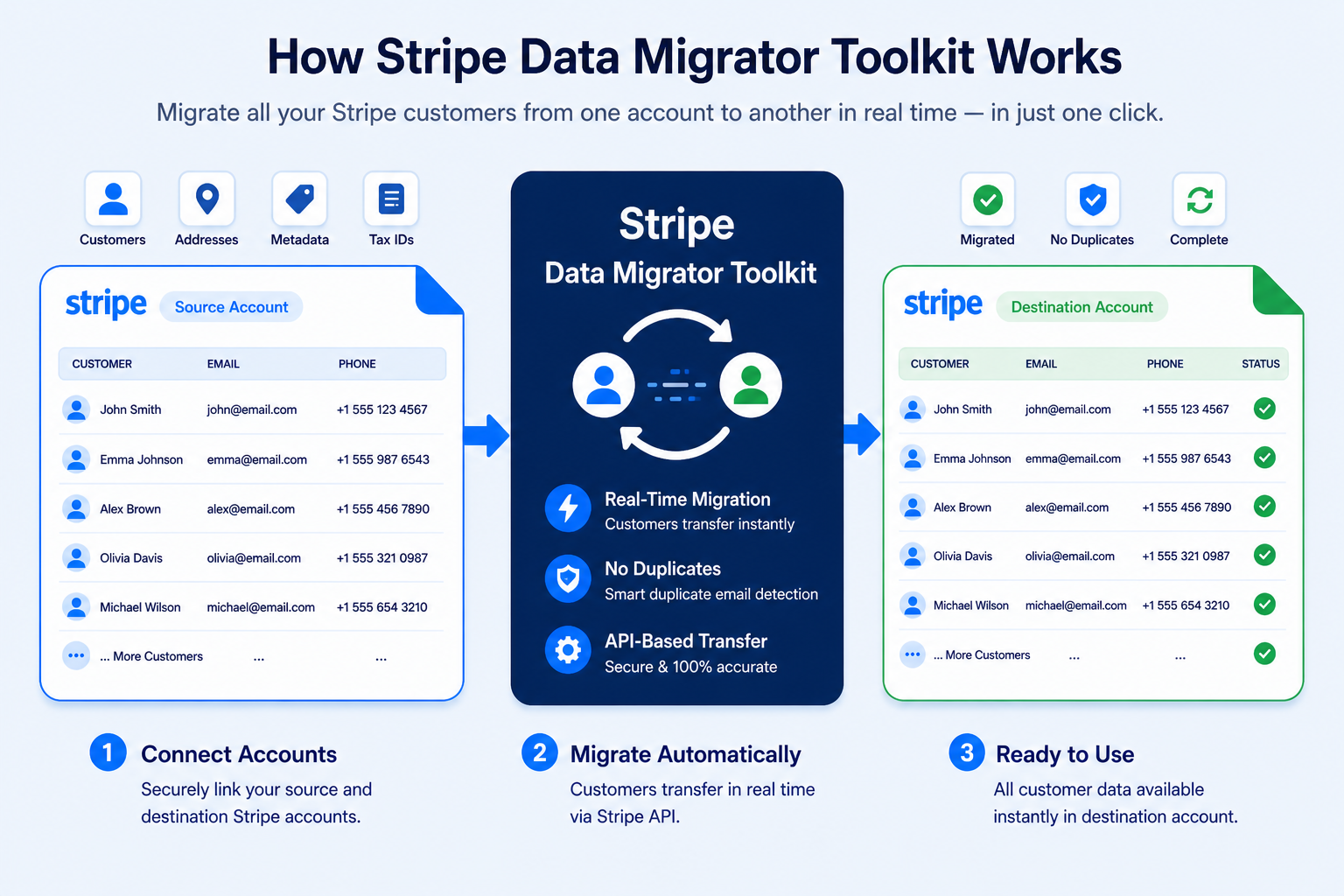
How It Works:
- Connect Your Accounts – Link your source and destination Stripe accounts securely using your account credentials.
- Click Migrate – The app automatically fetches all customers from your source account in smart paginated batches.
- Migrate in Real Time – Every customer profile is recreated in the destination account instantly, with all data fields preserved exactly as-is.
- Track Progress Live – Monitor total customers migrated in real-time.
Key Features & Benefits
⚡ Speed & Efficiency
- ✅ Bulk customer migration — transfer your entire Stripe customer list in one automated run
- ✅ Real-time processing — customer profiles appear in the destination account as they migrate, not after a long wait
- ✅ Save hours or days — eliminate manual customer data re-entry forever
- ✅ Paginated batch processing — handles accounts with thousands of customers without timeouts or failures
🛡️ Accuracy & Data Integrity
- ✅ 100% accurate customer data — migrated directly via Stripe’s official API with no data loss
- ✅ No missed customers — automated pagination processes every record regardless of account size
- ✅ Complete field preservation — name, email, phone, billing address, shipping address, metadata, tax IDs, and description all transferred intact
- ✅ Smart duplicate elimination — if multiple entries share the same email address, the system intelligently detects them and ensures only one clean customer profile is created in the destination account
🔧 Complete Customer Data Transfer
- ✅ Full customer profile — name, email, phone number, and description migrated automatically
- ✅ Billing address — complete billing address including all lines, city, state, postal code, and country
- ✅ Shipping details — shipping name, phone, and full shipping address transferred intact
- ✅ Metadata — all custom key-value metadata fields migrated exactly as configured in the source account
- ✅ Tax IDs — all customer tax IDs including type and value transferred to the destination account
👨💻 Ease of Use (No Technical Skills Required)
- ✅ No coding required — simple one-click migration, no API knowledge needed
- ✅ No CSV exports or imports — everything handled automatically via Stripe’s API
- ✅ Resume from any point — migration continues exactly where it left off after any interruption, with no records processed twice
- ✅ Credits never expire — buy credits and use them whenever you need, at your own pace
- ✅ Safe to re-run — smart duplicate detection means restarting migration never creates duplicate customer profiles
What Exactly Gets Migrated
Stripe Data Migrator Toolkit is a customer migration tool. It transfers your Stripe customer profiles — and all the data fields that belong to them — from one Stripe account to another. Here is exactly what is migrated for every customer:
✅ Customer Name
The customer’s full name as stored in the source account is transferred exactly to the destination account.
✅ Email Address
The customer’s email address is migrated and also used by the smart duplicate detection system to prevent the same customer from being created twice.
✅ Phone Number
Customer phone number is transferred intact.
✅ Description
Any customer description or internal notes stored on the Stripe customer object are migrated automatically.
✅ Billing Address
The complete billing address — address line 1, address line 2, city, state, postal code, and country — is transferred for every customer.
✅ Shipping Details
The full shipping record — including shipping name, shipping phone number, and complete shipping address — is migrated intact.
✅ Metadata
All custom key-value metadata fields are transferred automatically. Your internal references, integration data, and custom identifiers arrive in the destination account exactly as configured. The source account’s customer ID is also added to the destination customer’s metadata for full traceability.
✅ Tax IDs
All customer tax IDs — including tax ID type and value — are fetched from the source account and recreated in the destination account.
❌ What Is Not Migrated
This tool migrates customer profile data only. Subscriptions, invoices, payment methods, charges, and other Stripe objects are not migrated. Payment methods in particular cannot be transferred between Stripe accounts by design — Stripe cryptographically binds them to the account where they were created for security and compliance reasons. This is standard across all Stripe account migrations and applies universally, not just to this tool.
Smart Duplicate Detection & Elimination
One of the most powerful features of Stripe Data Migrator Toolkit is its intelligent duplicate management. Before migrating each customer, the system checks whether a customer with the same email address already exists in the destination account. If a match is found, that customer is automatically skipped — no duplicate is created.
This means you can:
- ✅ Re-run a migration safely — restart at any time without creating duplicate profiles
- ✅ Resume after a pause — pick up exactly where you left off with no duplicates introduced
- ✅ Consolidate multiple accounts — migrate from several source accounts into one destination account, and the system will automatically eliminate any customers that appear in more than one source
- ✅ Keep your destination account clean — only one accurate, complete customer profile is ever created per unique email address
Who Uses Stripe Data Migrator Toolkit?
- ✅ Businesses — transfer customer profiles when rebranding, restructuring, or opening a new Stripe account
- ✅ Agencies — migrate client customer lists as part of account handover or onboarding workflows
- ✅ E-commerce Stores — move all customer profiles when changing business entities or platforms
- ✅ SaaS Companies — migrate customer bases between Stripe environments
- ✅ Developers — perform account-to-account customer migrations without writing or maintaining custom scripts
- ✅ Operations Teams — consolidate multiple Stripe accounts into a single account efficiently
- ✅ Finance & Accounting Teams — ensure accurate customer records carry over during account transitions
- ✅ Startups — migrate customer data following acquisition, restructuring, or investor-driven account changes
Security First: Your Data Is Safe
- ✅ Secure authentication — industry-standard authorization for connecting Stripe accounts
- 🔐 Strong SSL encryption — all data transfers are encrypted end to end
- ✅ Official Stripe API — built entirely on Stripe’s trusted, official infrastructure
- ✅ Verified Stripe Marketplace App — reviewed and approved by Stripe
We take your privacy seriously. Your customer information is always encrypted and secured using industry best practices.
Pricing — Credits That Never Expire
- ✅ Free credits — explore and try the app at no cost
- ✅ Credits never expire — buy once, use whenever you need
- ✅ 1 Credit per customer migrated — only pay for successful customer transfers
- ✅ Automatic balance check — migration pauses cleanly when balance runs low, with a prompt to recharge and resume without losing progress
No monthly subscription required. Pay only for what you migrate.
Before vs After: Manual Migration vs Stripe Data Migrator Toolkit
| Action | Manual Customer Migration | Stripe Data Migrator Toolkit |
|---|---|---|
| Migrate 100 customer profiles | 1–2 days of manual data re-entry | Done in minutes automatically |
| Transfer customer metadata | Copy each field manually — data often lost | All metadata fields migrated automatically |
| Transfer customer tax IDs | Re-enter each tax ID by hand | All tax IDs migrated automatically |
| Transfer billing & shipping addresses | Copy field by field for every customer | Full address data transferred automatically |
| Eliminate duplicate customers | Manual check — unreliable and error-prone | Smart automatic duplicate email detection |
| Track migration progress | No visibility — no way to know what’s done | Real-time progress dashboard |
| Resume after interruption | Start from scratch every time | Picks up exactly where it left off |
| Technical skill needed | High — API knowledge or developer required | None — one-click operation |
| Risk of data loss | High — manual errors are common | Zero — direct API-to-API transfer |
| Scalability | Impossible at high volumes | Handles unlimited customers effortlessly |
Real-World Use Cases
📊 Use Case 1: Business Acquisition — Customer List Transfer
Challenge: A company is acquired and the new owners need all Stripe customer profiles transferred to their own Stripe account. Manually recreating thousands of customer records — with billing addresses, metadata, and tax IDs — would take weeks.
Solution: Use Stripe Data Migrator Toolkit to automatically transfer the entire customer list from the acquired company’s Stripe account to the new account in one run.
Result: Full customer list migrated in hours instead of weeks. Zero data loss. New account ready from day one.
🏢 Use Case 2: Agency Client Account Handover
Challenge: A digital agency manages Stripe accounts for clients during onboarding. At handover, all customer profiles — billing details, shipping addresses, and custom metadata — must move to the client’s own Stripe account cleanly and completely.
Solution: Use the Toolkit to migrate all customer profiles from the agency’s Stripe account to the client’s account in one click. Duplicate detection ensures a clean, accurate transfer.
Result: Client account handover completed in minutes. Every customer profile transferred perfectly, with nothing missing or duplicated.
🔍 Use Case 3: Business Rebrand and New Stripe Account
Challenge: A business rebrands and opens a new Stripe account under the new legal entity. All existing customers — with their complete billing and shipping details — need to be available in the new account immediately.
Solution: Use the Toolkit to automatically transfer all customer profiles to the new account, preserving every field including metadata and tax IDs.
Result: New account fully populated and ready to operate from day one. No customer relationships disrupted.
📈 Use Case 4: Consolidating Multiple Stripe Accounts
Challenge: A business operates multiple Stripe accounts across different product lines and wants to consolidate into a single account. Thousands of customer profiles are spread across accounts, with some email addresses appearing in more than one.
Solution: Run the Toolkit once for each source account, pointing to the same destination. The smart duplicate detection automatically skips any customer whose email already exists in the destination — no manual deduplication needed.
Result: All accounts consolidated cleanly. One accurate customer list in a single Stripe account, with zero duplicates.
Ready to Get Started?
- ✅ Install directly from Stripe Marketplace — takes under 1 minute
- ✅ Free credits — start migrating today at no cost
- ✅ Migrate your first batch of customers today — see results immediately
✅ Trusted by businesses globally · Verified Stripe Marketplace App · 5⭐ User Rating
Frequently Asked Questions
- Q: What exactly does Stripe Data Migrator Toolkit migrate?
- A: The Toolkit migrates Stripe customer profiles only. For each customer, it transfers the full name, email address, phone number, description, complete billing address, complete shipping address and name, all metadata key-value pairs, and all tax IDs. It does not migrate subscriptions, invoices, charges, or payment methods — those are separate Stripe objects outside the scope of this tool.
- Q: How many customers can I migrate at once?
- A: There is no limit. The Toolkit processes all customers from your source Stripe account automatically in paginated batches, regardless of how many you have. Whether you have 100 or 100,000 customers, every one is migrated.
- Q: How does duplicate detection work?
- A: Before migrating each customer, the Toolkit checks whether a customer with the same email address already exists in the destination account. If one is found, that customer is automatically skipped. This means you can safely re-run or resume a migration at any time without creating any duplicate profiles. If multiple source customers share the same email address, the system ensures only one clean profile is created in the destination.
- Q: Are payment methods migrated?
- A: No. Payment methods — credit cards, bank accounts, and other saved payment details — are not migrated. This is a fundamental Stripe platform restriction: payment methods are cryptographically bound to the Stripe account where they were created and cannot be accessed or used on any other account. This applies universally to all Stripe account migrations, not just this tool. Customers will simply re-enter their payment details on their next transaction with the new account.
- Q: Are subscriptions or invoices migrated?
- A: No. Stripe Data Migrator Toolkit migrates customer profiles only. Subscriptions, invoices, charges, and other Stripe objects are outside the scope of this tool.
- Q: Do my credits expire?
- A: No. Your credits never expire. Buy them once and use them whenever you need, at your own pace.
- Q: What happens if my balance runs out mid-migration?
- A: The migration pauses automatically and returns a clear message. The pagination cursor is preserved, so once you recharge, you resume exactly where you left off — no customer is processed twice and no progress is lost.
- Q: Can I consolidate customers from multiple Stripe accounts?
- A: Yes. Run the Toolkit multiple times with different source accounts pointing to the same destination. The duplicate email detection ensures no customer appears more than once in the final destination account.
- Q: Does this work with Stripe test mode?
- A: Yes. The Toolkit works in both Stripe live mode and test mode, making it easy to test the migration before running it on your real customer data.
- Q: Do I need technical skills to use the Toolkit?
- A: No. The Toolkit uses a simple one-click interface. No coding, no API scripts, no CSV exports or imports required. Anyone on your team can run a full customer migration.
- Q: What happens if a customer migration fails?
- A: Failed migrations are logged with a status code and the exact error message returned by Stripe, so you can clearly see which customers were affected and why.
What Our Clients Say
We needed to move over 12,000 customers from one Stripe account to another after restructuring. Stripe Data Migrator Toolkit saved us days of manual CSV cleanup. It transferred all customer data, addresses, metadata, and tax IDs cleanly. Worked flawlessly on the first run.
— Daniel Cooper
Our old Stripe account was being closed and we needed to move customer profiles fast. This tool allowed us to migrate customer records in one click without touching spreadsheets or writing code. Super simple and the interface is very clean.
— Jacob Williams
We’ve handled Stripe customer migrations before, but with this tool, everything was transferred exactly as-is — and the automated duplicate removal was a huge bonus.
— Emily Hart
Conclusion
Manually recreating Stripe customer profiles in a new account — field by field, one by one — doesn’t have to be part of your workflow anymore. Stripe Data Migrator Toolkit transforms what used to take days of painful manual re-entry into an automated migration that completes in minutes.
Instead of opening each customer profile individually, copying their details, and recreating them in a new account hundreds of times over, you simply connect your accounts and click migrate — the Toolkit handles everything automatically. Every customer’s name, email, phone, billing address, shipping details, metadata, and tax IDs transfer directly via Stripe’s official API, with nothing left behind and no duplicates created.
Whether you’re migrating 10 customers or 10,000, the process is the same — effortless, accurate, and fast. Businesses complete account handovers in minutes. Agencies transfer client customer lists in seconds. Operations teams consolidate multiple Stripe accounts without a single duplicate record. Everyone gets their customer data moved without the manual work.
The Toolkit is purpose-built for one job: migrating Stripe customer profiles cleanly and completely. No subscriptions, no invoices, no payment methods — just your customer list, transferred perfectly, with smart duplicate elimination built in.
No coding. No CSV exports. No manual re-entry. No technical expertise required. Anyone on your team can migrate an entire Stripe customer list in minutes.
Ready to stop wasting time on manual Stripe customer migration?
Get started with Stripe Data Migrator Toolkit now and experience effortless Stripe customer migration.


