


The app automatically generates and imports large volumes of invoices into your Stripe account within seconds—helping you charge customers automatically, send invoices, and collect payments effortlessly. Seamless, straightforward, and no technical expertise needed!
Instantly generate Stripe invoices in bulk from spreadsheets — CSV, Excel, and Google Sheets — and save hours of manual work.
Turn your spreadsheets into Stripe invoices.
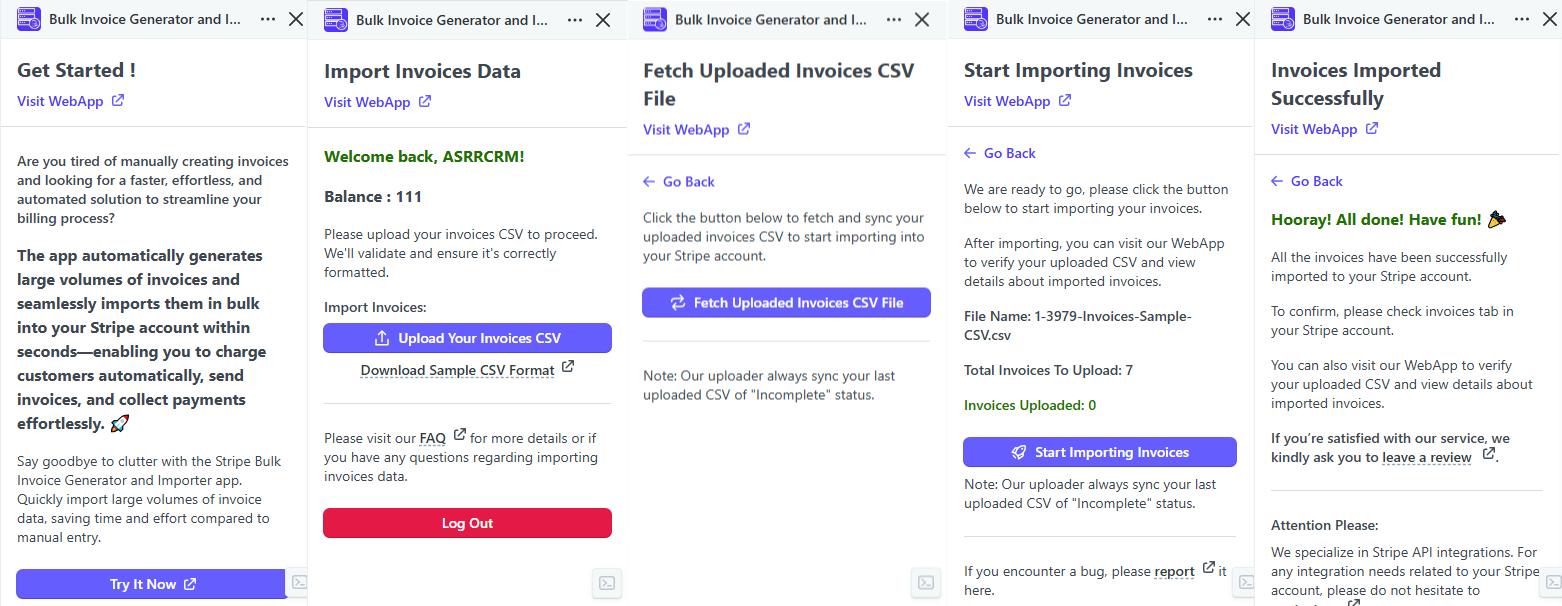
Effortlessly bulk upload your invoices to your Stripe account in just a few seconds. This app quickly imports large volumes of CSV formatted invoice data, saving you time and effort compared to manual entry.
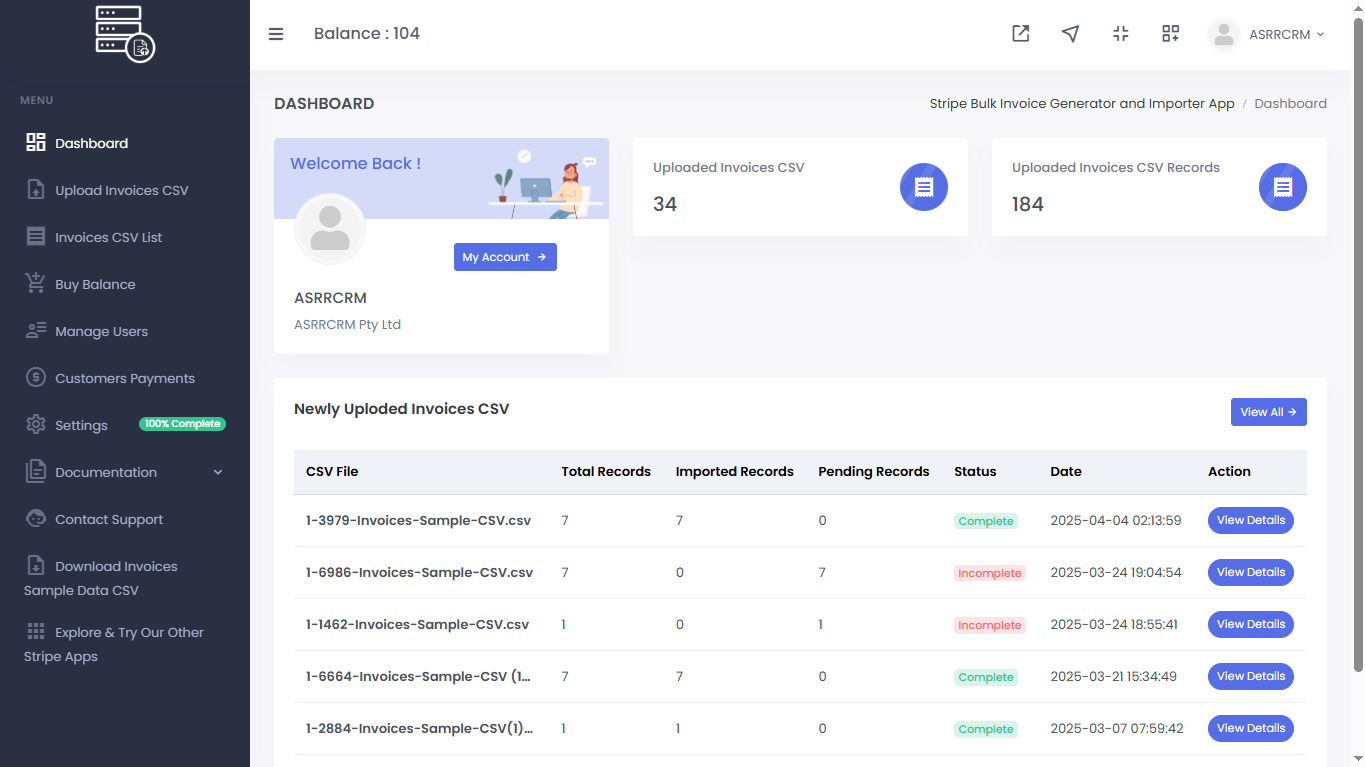
We provide a quick and easy 3-step workflow for bulk importing invoice data—effortless and straightforward, with no technical expertise needed!
With the Stripe “Bulk Invoice Generator and Importer” app, you can effortlessly bulk upload your invoices to your Stripe account in just a few seconds.
This app quickly imports large volumes of invoice data, saving you time and effort compared to manual entry.
This app has been a game-changer for our business. We were struggling to manually upload hundreds of invoices each month, but now everything syncs seamlessly. The process is efficient, and it has saved us hours of manual work. Highly recommended!
The app made our invoicing process so much easier! The bulk import feature is incredibly helpful, and it integrates smoothly with our Stripe account. The ability to upload multiple invoices at once has significantly reduced our workload. The app is intuitive and works exactly as promised.
I was amazed by how quickly we could integrate the Stripe Bulk Invoice Generator with our current system. The app is user-friendly and seamless, and it’s been incredibly reliable. No more tedious manual uploads! This app has streamlined our workflow and reduced the chances of human error.
We’ve been using the Stripe Bulk Invoice Generator and Importer for a few months now, and it’s been fantastic. The speed and accuracy with which invoices are uploaded into Stripe are truly impressive. It’s an app that saves us significant time and ensures our invoicing is always up to date.
I’ve been trying out the Bulk Customer and Bulk Invoice uploader the last couple of days. The apps work just great and will reduce enormously the workload in sending out fees to our members (we’re a tennis club). What I have been hugely impressed with has been the support. The customer importer worked perfectly first time but I was having problems with the invoicing. There were two issues – they both turned out to be user error – but I sent off a support request expecting a long wait. Imagine my surprise when, within a few minutes, I received a WhatsApp message from support who then patiently talked me through the fixes. Minutes later we had a succesful upload along with a couple of tips as to how I could improve my process! Good products live or die based on the support you receive. I can recommend this product to anyone as a result of my experience.
Find answers to common questions about our services, features, and processes. We’ve compiled helpful information to guide you through every step.
Please refer to the banner top of this page for an overview and detailed workflow of the app.
The Stripe Bulk Invoice Generator and Importer app is a Stripe app that allows you to quickly and easily import large amounts of invoice data into your Stripe account in one go, saving time and reducing errors compared to manual entry.
Install the Stripe Bulk Invoice Generator and Importer app from the Stripe Marketplace or by clicking “Try It Free” on our website. Log in, download the formatted sample CSV, organize your invoice data, upload the file, and start importing.
Yes, we offer a free trial with a 20-credit balance to help you understand and explore how the app works. If you need to upload additional invoices, you will need to purchase more credits. For detailed information, please refer to the pricing page here.
The app is a paid service, but we offer a free trial with a 20-credit balance to help you understand and explore how the app works. If you need to upload additional invoices, you will need to purchase more credits. For detailed information, please refer to the pricing page here.
Yes, we offer a 14-day 100% refund guarantee for the unused portion of the balance you have purchased if you are not satisfied with our service. To request a refund, please contact our support team with your purchase details. Our team will review your request and process the refund under the outlined terms and conditions.
You can import invoice data and other related information into your Stripe account. Please refer to our documentation for detailed information on specific fields.
Yes, depending on your needs, you can use the Stripe “Bulk Invoice Generator and Importer” app to import both live and test data into your Stripe account.
There is no strict limit, but it’s recommended to keep your CSV file optimized for faster processing. For extremely large datasets, splitting the file into smaller batches may improve performance.
If you run the process again with the same uploaded file, it will not duplicate invoices. Our app tracks the progress of imported invoices and will only process the remaining invoices that were not yet imported.
Note: If you re-upload the same invoice CSV file and process it again, it will duplicate the invoices, as you are now working with a separate CSV file.
If errors are detected during the import process, the app will generate a CSV file containing the problematic records. You can download this file, correct the errors, and re-upload the corrected data.
We prioritize data security. All invoice data uploaded through the Stripe “Bulk Invoice Generator and Importer” app is encrypted and handled according to industry-standard security practices.
No technical expertise is required. The process is straightforward—just follow the three-step workflow to import your data effortlessly.
No, the app only allows you to import invoice data into your Stripe account.
If you experience any problems during the import process, feel free to report bug or contact our support team for assistance. We’re here to help!
No, this app only imports invoices. We have another Stripe application that enables the bulk import of Stripe customers. You can find it on the Stripe Marketplace or download it directly from there.
The app automatically generates and imports large volumes of invoices into your Stripe account within seconds—helping you charge customers automatically, send invoices, and collect payments effortlessly. Seamless, straightforward, and no technical expertise needed!


Copyright © 2024 Stripe "Bulk Invoice Generator and Importer" app. All Rights Reserved. Powered by ASRRCRM.
