
Install App
Contact

Create Hundreds of Stripe Subscriptions in Minutes

Create, import, and schedule large volumes of Stripe subscriptions directly from your dashboard using CSV, Excel, and Google Sheets — no APIs, no coding, no manual work.

Turn your spreadsheets into Stripe subscriptions.
Install App
  • Stripe Marketplace App

  • Works with Stripe Subscriptions

  • No Code Automation

Stripe Subscriptions

The Fastest Way to Create Bulk Subscriptions in Stripe

Stop creating subscriptions one by one. Upload a spreadsheet, validate your data, and let the app handle the rest — directly inside your Stripe Dashboard.

Stripe Bulk Subscription Manager is a Stripe Dashboard app that allows businesses to create large volumes of subscriptions simultaneously — without writing a single line of code. Prepare your customer subscription data in a CSV, Excel, or Google Sheet file using our pre-formatted template, upload it to the app, and the system validates every row for errors before creating each subscription in your Stripe account.

The app supports the full range of Stripe’s subscription capabilities — from immediate and scheduled start dates, to free trials, billing cycle anchors, setup fees, discounts, tax rates, cancellation rules, and custom invoice fields. Every subscription is created with the exact parameters you specify, giving you complete control over how each customer is billed.

Built for SaaS companies, subscription businesses, agencies, and finance teams who need to migrate existing customers to Stripe, launch subscription plans at scale, or manage recurring billing for large customer bases without manual data entry.

Prepare Your Data File

Download our pre-formatted CSV, Excel, or Google Sheet template, fill in your customer subscription data, and save. Each row is one subscription for one customer — up to 28 supported fields.

Upload to the WebApp

Visit the WebApp from your Stripe Dashboard, upload your CSV, Excel, or Google Sheet file, and the system instantly validates your data before anything is sent to Stripe.

Validate Before Anything

Every row is checked for errors before a single subscription is created — wrong formats, missing fields, conflicting rules. All issues are shown with clear row-by-row error messages.

Create Subscriptions Instantly

Click one button inside your Stripe Dashboard app and all subscriptions are created simultaneously via Stripe’s official API — with the exact parameters you specified. Immediate or scheduled, simple or complex.

Track Results in Real Time

Watch subscriptions being created live — total count, success count, and any failures shown in real time. All records are stored in your WebApp for full review and audit.

Fix & Re-Process Failures

Any failed subscriptions are logged with the exact Stripe error. Fix the issue — update the payment method, price ID, or any field — and re-process just the failed rows without re-uploading the entire file.

Install App

The Old Way vs The Smart Way

See exactly what changes when you stop creating subscriptions manually and start using Stripe Bulk Subscription Manager.

With Stripe Bulk Subscription Manager

  • Create hundreds of subscriptions simultaneously via CSV, Excel, and Google Sheets — one file upload replaces hundreds of manual clicks

  • 100 subscriptions created in under 10 minutes — what used to take a full day is done before your morning coffee

  • Every row is validated before import — wrong formats, conflicting rules, and missing fields are caught upfront with clear error messages

  • Zero coding, zero API knowledge, zero developers needed — anyone on your team can do it from a spreadsheet

  • Schedule bulk subscriptions for any future start date — the app creates Stripe Subscription Schedules automatically

  • Set different trials, discounts, setup fees, and tax rates per customer — each row is fully independent with complete per-customer control

  • Backdate subscriptions for migrated customers in bulk — Stripe generates prorated invoices automatically for the catch-up period

  • Full audit trail in your WebApp — every record, every result, every failure logged and available for review and re-processing

Without This App

  • Create every subscription one by one inside the Stripe Dashboard — clicking through the same screens hundreds of times

  • 100 subscriptions takes hours of repetitive manual entry — entire day wasted on data input alone

  • Human errors are unavoidable — wrong plan, wrong billing date, wrong payment method — with no validation to catch them

  • Requires API knowledge or a developer to handle any bulk operation — expensive and slow

  • No way to schedule multiple subscriptions for future start dates in bulk — each must be configured individually

  • Applying different trials, discounts, setup fees, and tax rates per customer means re-configuring every single one manually

  • Migrating existing customers from another billing platform means manually backdating every subscription one by one

  • No central record of what was imported — no audit trail, no way to review or re-process failures

Workflow

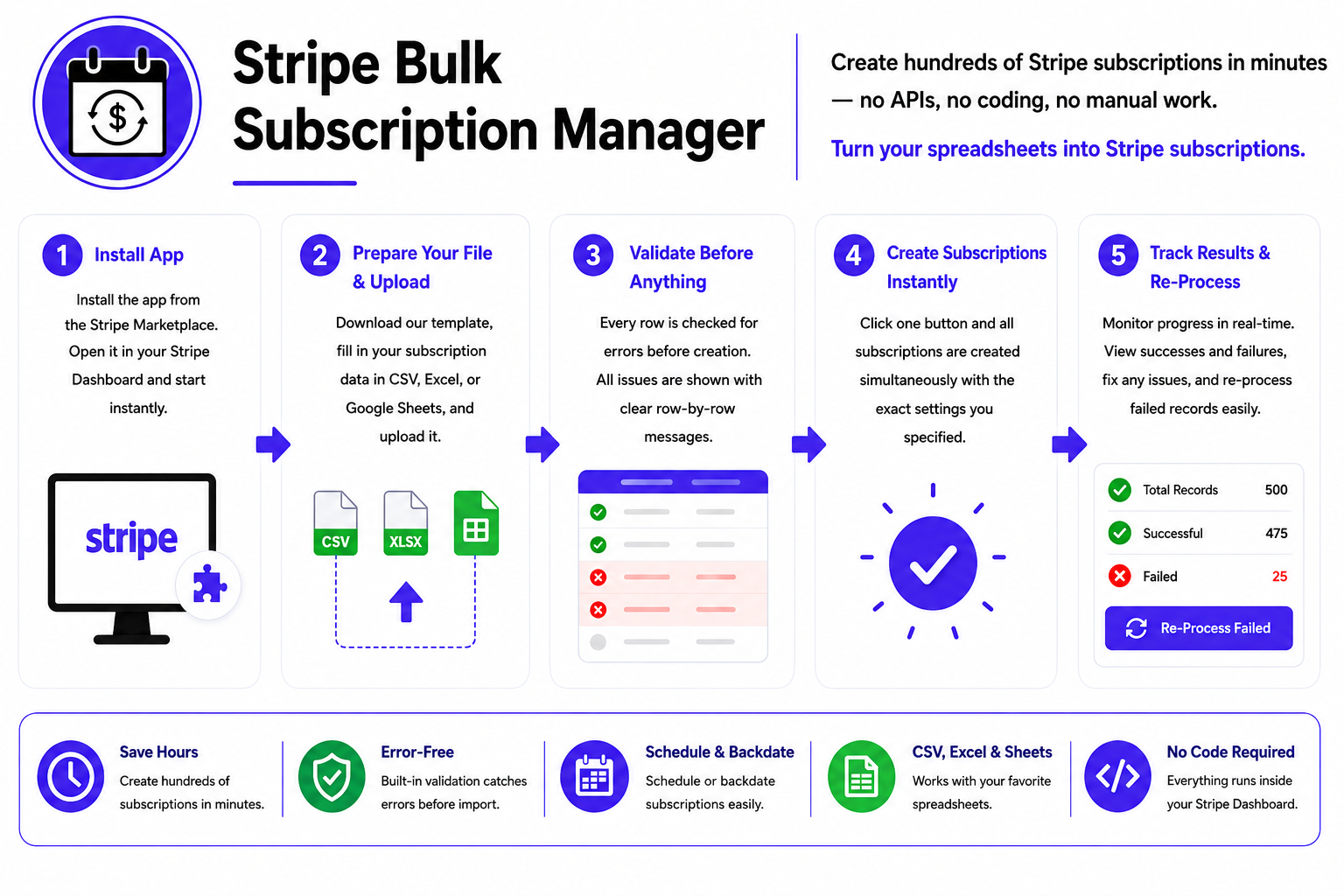
Create hundreds of Stripe subscriptions in minutes — no APIs, no coding, no manual work.

Install App

Install the Stripe “Bulk Subscription Manager” app directly from the Stripe Marketplace. Open it inside your Stripe Dashboard and your account is created automatically — no manual registration required.

Prepare Your File & Upload

Download our pre-formatted CSV, Excel, or Google Sheet template, fill in your customer subscription data, and upload it to the WebApp. The system instantly validates every row for errors before anything is sent to Stripe.

Create & Done

Click one button inside the Stripe Dashboard app and all subscriptions are created simultaneously — immediate or scheduled, simple or complex. Track results live and re-process any failures directly from the WebApp.

Install Now

Everything You Need for Bulk Subscription Management

A complete feature set built on top of Stripe’s full subscription API — covering every billing scenario your business needs.

Immediate & Scheduled Subscriptions

Start subscriptions right now or schedule them for a future date. Scheduled subscriptions use Stripe’s Subscription Schedules — status stays not_started until the start date arrives.

Automatic & Invoice-Based Billing

Supports both charge_automatically and send_invoice — charge cards automatically or email invoices for manual payment.

Payment Method Management

Attach a specific payment method per subscription. Set as subscription-level default — renewals are always automatic without affecting the customer’s other payment methods.

Free Trial Periods

Add trial days (1–730) to any subscription. Customers get free access during trial, then billing starts automatically — for both collection methods.

Billing Cycle Anchor

Force all customers to be billed on the same day every month — e.g. always on the 1st. Prorated charges for short first periods are handled automatically.

Flexible Cancellation Rules

Set cancellation on a specific date, at end of billing period, or after a schedule ends. Full validation prevents conflicting cancellation rules from being submitted.

One-Time Setup Fees

Add a one-time setup fee to the first invoice — currency auto-detected from the Price ID. No separate Stripe Product needed. Customise the line item label per customer.

Coupons & Promotion Codes

Apply Stripe coupons or promotion code API IDs per subscription. The app auto-detects which type you’re using based on the ID prefix.

Tax Rate & Automatic Tax Support

Apply manual Tax Rates (txr_) or enable Stripe Tax automatic calculation per subscription. Both cannot be used together — validation catches this.

Business & Customer Tax IDs

Display your business VAT/GST registration on invoices. Also supports adding customer tax IDs (VAT, ABN, GST, EIN) for B2B invoicing compliance in any country.

Invoice Memo & Custom Footer

Add a memo visible to customers on their invoice PDF, and a custom footer for legal text or payment instructions. Supports multi-line text with line break formatting.

Custom Fields & Metadata

Add up to 4 custom fields visible on the invoice PDF (PO numbers, project codes), plus unlimited internal Metadata for your own CRM IDs and reference data.

Backdate Subscriptions

Backdate subscription start dates for existing customers migrating to Stripe. Stripe generates a prorated first invoice covering the period from the past date to today.

Full Pre-Import Validation

Every row is validated before any subscription is created. Clear, row-by-row error messages identify exactly what needs to be fixed — with the customer ID shown in every error.

Real-Time Progress Tracking

Watch subscriptions being created in real time. Total count, created count, and failed records are shown live. All results are stored in your WebApp for review and re-processing.

Install App

Why Businesses Choose Stripe Bulk Subscription Manager

Save hours of manual work and eliminate errors with a tool built specifically for teams who manage subscriptions at scale.

  • Save Hours of Manual Work

  • Catch Errors Before They Happen

  • Backdate Subscriptions for Existing Customers

  • Works with CSV, Excel, and Google Sheets

  • Zero Coding Required

  • Full Stripe Feature Support

  • Per-Customer Customisation at Scale

  • B2B Invoice Compliance Built In

Install App
Save Hours of Manual Work

Creating 500 subscriptions one by one in the Stripe Dashboard takes hours. With this app, you upload one file and it’s done in minutes. What used to take a full day now takes less than 10 minutes — freeing your team for higher-value work.

Catch Errors Before They Happen

The built-in validator checks every row before a single subscription is created. Conflicting fields, wrong formats, missing required data — all caught upfront with clear error messages. No partial imports, no failed subscriptions that slip through.

Backdate Subscriptions for Existing Customers

Moving customers from another billing platform to Stripe? The backdating feature lets you create subscriptions with historical start dates so billing continuity is maintained. Note: payment methods cannot be migrated from another platform — your customers will need to provide their payment details again in Stripe before their first charge. For send_invoice customers, no payment method is needed upfront.

Works with CSV, Excel, and Google Sheets

Use whatever tool your team is comfortable with. The app accepts both .csv and .xlsx files. Download the pre-formatted sample file, fill in your data, and upload. The column structure is validated automatically.

Zero Coding Required

No API keys to configure, no scripts to write, no developers to hire. The app runs directly inside your Stripe Dashboard. If you can fill in a spreadsheet, you can use this app. Anyone on your team can do it.

Full Stripe Feature Support

This isn’t a simple bulk importer. It supports the full depth of Stripe’s subscription API — trials, anchors, schedules, cancellation rules, tax, discounts, setup fees, custom fields, and more. You get the same power as the API without writing any code.

Per-Customer Customisation at Scale

Every row in your file can have completely different settings — different plans, prices, trial periods, payment methods, discounts, setup fees, and cancellation rules. True per-customer control without any manual configuration in the Dashboard.

B2B Invoice Compliance Built In

For businesses selling to other businesses, the app supports customer tax IDs (VAT, GST, ABN, EIN), account tax IDs, invoice memos, custom fields, and footers — everything needed for compliant B2B invoicing across any country.

Real Feedback from Our Happy Clients

Discover what our clients have to say about their experiences with us. From seamless service to exceptional results, our customers’ success stories speak for themselves.

“We migrated 800 existing customers to Stripe subscriptions in under 20 minutes. What would have taken our team two full days of manual work was done in one batch upload. The validation caught three errors before import — saved us from a billing nightmare.”

James Whitfield

“We onboard new clients every month and used to create their Stripe subscriptions one by one. Now we prepare a file, upload it, and they’re all live within minutes. Our billing process went from 3 hours to 10 minutes.”

Sarah Mitchell

“The pre-import validation is what sold me. It catches every mistake before anything touches Stripe — wrong formats, conflicting fields, and missing payment methods. We’ve never had a failed import since we started using it.”

Daniel Okafor

“We moved from another billing platform to Stripe and used the backdating feature to preserve all our customers’ original subscription start dates. Prorated invoices were generated automatically. The migration was seamless.”

Rachel Thompson

“As an agency managing Stripe for multiple clients, being able to bulk create subscriptions with different plans, trials, and billing cycles per customer in a single file is incredibly powerful. It handles complexity I didn’t expect from a bulk tool.”

Marcus Reid

“Our sales team closes deals fast and finance needs subscriptions live immediately. We now keep a ready-to-upload template, fill in new clients, and the subscriptions are active within minutes of the deal closing. No developers involved at all.”

Priya Sharma

Built for Teams who Manage Subscriptions at Scale

Any business that needs to create multiple Stripe subscriptions without doing it manually one by one.

SaaS Companies

Launch a new pricing plan and move existing free users to paid subscriptions in one bulk import — with different trial periods per customer segment.

Agencies & Resellers

Set up recurring billing for multiple clients at once. Each client gets their own plan, payment method, invoice customisation, and billing cycle.

Platform Migrations

Moving from another billing platform to Stripe? Import all existing customers with backdated start dates so their billing history and cycle is preserved.

Enterprise Sales Teams

Sales team closes 50 annual contracts in a month. Finance uploads the batch file and all subscriptions go live at the right start dates automatically.

E-commerce & Memberships

Convert a cohort of one-time purchasers into recurring subscribers. Set scheduled start dates for future subscription activations.

Healthcare & Professional Services

Create recurring service agreements for clients with compliant B2B invoicing — including client tax IDs, custom fields, and invoice memos per agreement.

Explore & Try All Our Stripe Marketplace Apps

We build solutions to automate business processes, reduce costs and boost performance—enhance productivity, drive automation and streamline workflows. Experience the power of ASRRCRM apps—supercharge your Stripe workflow and take your business productivity to the next level.

Explore All Apps
Access Bundle Toolkit
Install App
Contact