

Install App
Contact

Automate Usage-Based Metered Billing in Stripe — No Code Needed

The app lets you create metered subscriptions and report customer usage events in bulk — directly from your Stripe Dashboard using CSV, Excel and Google Sheets. No APIs. No scripts. No manual work.

Stop manually creating and sending invoices, building metered subscriptions one by one, and uploading usage records by hand. Bulk upload usage events, charge customers based on consumption, and automate recurring usage reporting — all without writing a single line of code.
Install App
  • Stripe Marketplace App

  • Works with Stripe Subscriptions & Meters

  • No Code Automation

Strip Bulk Usage-Based Metered Billing Workflow

The Complete Solution for Usage-Based Billing Operations in Stripe

Stop manually creating metered subscriptions and uploading usage one by one. Use a spreadsheet, validate your data, and let the app handle the rest — directly inside your Stripe Dashboard.

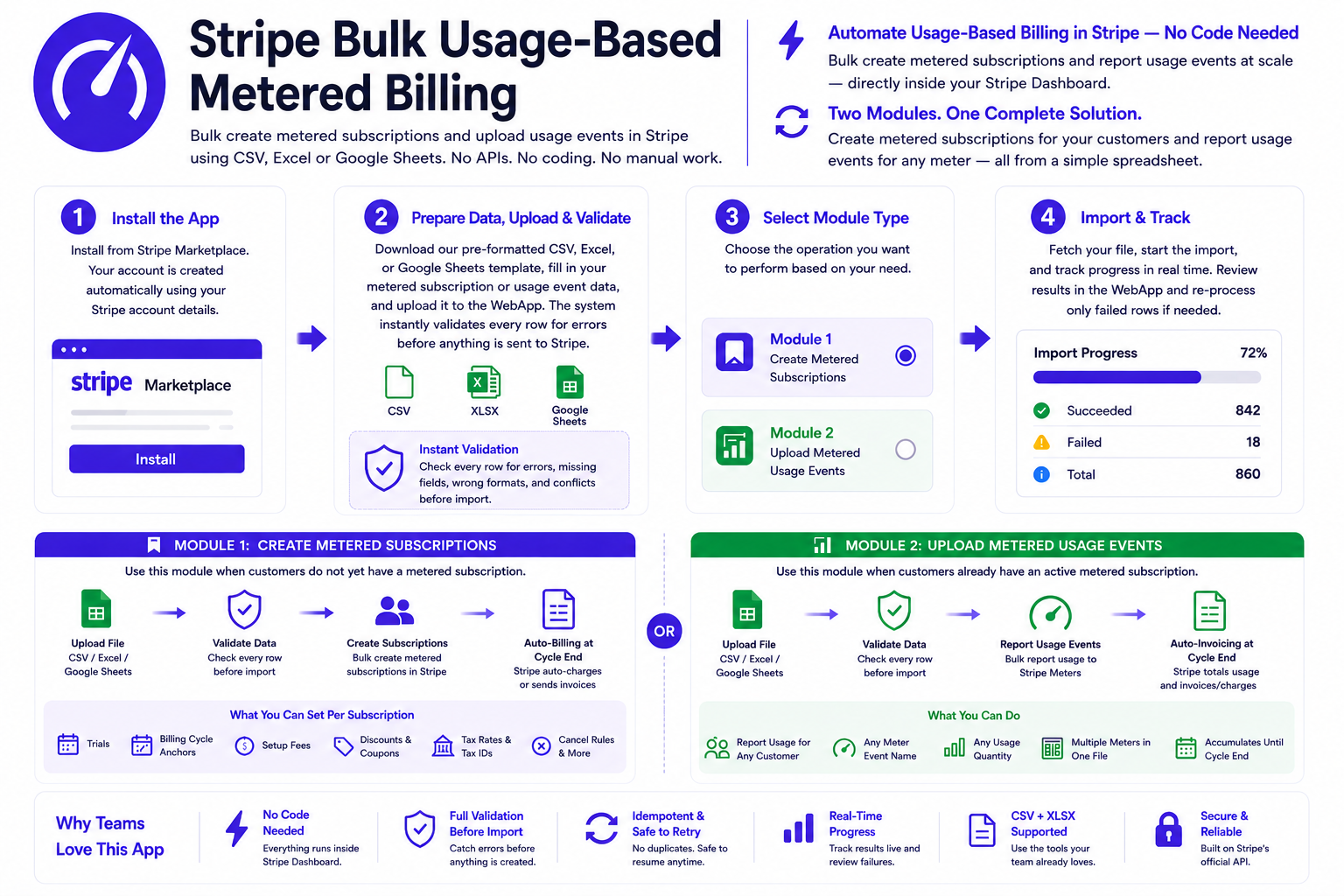
Bulk Usage-Based Metered Billing is a Stripe Dashboard app that automates both sides of usage-based billing — creating metered subscriptions in bulk and reporting customer usage events to Stripe Billing Meters at scale. The entire workflow runs inside your Stripe Dashboard, using CSV or Excel files that anyone on your team can prepare without writing a single line of code.

The app is built around two focused modules. Module 1 lets you create large volumes of metered subscriptions simultaneously — linking customers to usage-based Stripe prices with full support for trials, billing cycle anchors, setup fees, discounts, tax rates, scheduled start dates, and cancellation rules. Module 2 lets you bulk-report usage events against your Stripe Billing Meters — for any number of customers, any meter, and any usage quantity — in a single file upload.

Built for SaaS companies, AI platforms, API businesses, agencies, and finance teams who charge customers based on consumption — tokens used, API calls made, emails sent, storage consumed, or any other measurable metric. If your pricing model is usage-based, this app is built for you.

Prepare & Upload a Spreadsheet

Prepare and upload your data using our pre-formatted CSV, Google Sheet or Excel template. Each row is one metered subscription or one usage event — whichever operation you need to perform.

Validate Before Import

The app checks every row for errors — wrong formats, missing fields, invalid meter names, conflicting rules — and shows clear, row-by-row error messages before anything is created.

Create or Report in Bulk

One click creates all metered subscriptions or reports all usage events directly in your Stripe account using the official Stripe API — with full accuracy and idempotency protection.

Track Results in Real-time

Watch progress live. Review all created records and any failures in your WebApp — and re-process just the failed rows without re-uploading the entire file.

Install App

One app — Two Powerful Billing Operations

Each module handles a distinct part of the metered billing workflow. Use them together or independently depending on your needs.

Module 1 — Create Metered Subscriptions

Use when customers do not yet have a metered subscription. Link them to a usage-based Stripe price in bulk — with full control over every billing parameter.

  • Bulk create metered subscriptions from CSV or Excel

  • Supports charge_automatically and send_invoice

  • Set trials, billing anchors, and scheduled start dates

  • Add one-time setup fees per customer

  • Apply discounts, tax rates, and tax IDs

  • Backdate subscriptions for existing customers

  • Full pre-import validation — row by row

Module 2 — Upload Metered Usage Events

Use when customers already have active metered subscriptions. Report their usage in bulk — for any meter, any quantity, any number of customers — in one upload.

  • Bulk report usage events to Stripe Billing Meters

  • Supports multiple meters in one file

  • Report for any customer, any usage quantity

  • Usage accumulates during the billing cycle

  • Stripe auto-bills at cycle end — no action needed

  • Idempotency protection — no duplicate events

  • Full pre-import validation — row by row

Workflow

The same simple workflow applies to both modules — metered subscription creation and usage event reporting.

Install App

Install the Bulk Usage-Based Metered Billing app directly from the Stripe Marketplace. Open it inside your Stripe Dashboard and your account is created automatically — no manual registration required.

Prepare Your File & Upload

Download our pre-formatted CSV, Excel, or Google Sheets template, fill in your metered subscription or usage event data, and upload it to the WebApp. The system instantly validates every row for errors before anything is sent to Stripe.

Create/Import & Done

Click one button inside the Stripe Dashboard app and all metered subscriptions are created — or all usage events are reported to your Stripe meters — simultaneously. Track results live and re-process any failures directly from the WebApp.

Install Now

The Old Way vs The Smart Way

See exactly what changes when you stop managing metered billing manually and start using the Stripe Bulk Usage-Based Metered Billing app.

With Stripe Bulk Usage-Based Metered Billing App

  • Bulk automation via CSV, Excel and Google Sheets

  • Create hundreds of metered subscriptions at once — one file upload replaces hundreds of manual Stripe Dashboard sessions

  • Report usage for any number of customers across any number of meters — from a simple spreadsheet, zero API knowledge required

  • Every API call is idempotency-protected — duplicate events are impossible even if the import is interrupted and resumed multiple times

  • Every row validated before import — wrong formats, invalid meter names, missing fields caught upfront with clear per-row error messages

  • Your entire team can run usage imports independently — no developer, no API, no code. Just a spreadsheet and one button

  • Full audit trail in your WebApp — every record, every result, every failure logged with exact error messages and available for review

  • Set trials, setup fees, discounts, and tax rates per customer in your spreadsheet — each row is fully independent

  • Resume any interrupted import exactly where it stopped — already-processed rows are skipped automatically, nothing is re-created

Without This App

  • Managing metered billing manually in Stripe

  • Create every metered subscription individually in the Stripe Dashboard — clicking through the same setup screens hundreds of times

  • Report customer usage by writing API scripts or calling the Stripe API manually — requires developer involvement every single time

  • Risk of duplicate usage events with no idempotency protection — customers get overbilled and disputes are difficult to resolve

  • No validation before reporting — wrong meter name, wrong customer ID, and zero-quantity events only fail after reaching Stripe

  • Non-technical team members cannot touch usage reporting — every upload requires engineering resources

  • No audit trail — no central record of what usage was reported, when, for which customers, or which events failed

  • Setting up trials, setup fees, tax rates, and discounts per customer means manual configuration for every single subscription

  • Resuming an interrupted import means starting over — no way to track what was already processed and what still needs to run

A Complete Feature Set for Metered Billing at Scale

Every feature is built directly on Stripe’s official API — giving you the full power of Stripe’s billing engine without writing any code.

Bulk Metered Subscription Creation

Module 1 — Subscriptions
Create hundreds of metered subscriptions simultaneously from a single CSV or Excel file. Each row is completely independent — different prices, payment methods, trials, and settings per customer.

Bulk Usage Event Reporting

Module 2 — Usage Events
Upload usage events for any number of customers and any number of meters in one file. Stripe accumulates all reported usage and automatically bills customers at the end of the billing cycle.

Automatic & Invoice-Based Billing

Module 1 — Subscriptions
Supports both charge_automatically and send_invoice — charge cards automatically at billing cycle end, or email invoices to customers for manual payment.

Multi-Meter Support in One File

Module 2 — Usage Events
Report usage across different meters in the same file upload. Each row specifies its own Meter_Event_Name — so you can report API requests, token usage, storage GB, and emails sent all in one batch.

Free Trial Periods

Module 1 — Subscriptions
Add trial days (1–730) to any metered subscription. Usage events can still be recorded during the trial — they accumulate but are not billed until the trial ends and the first billing cycle completes.

One-Time Setup Fees

Module 1 — Subscriptions
Add an upfront setup fee to the first invoice — especially valuable for metered billing, since metered subscriptions never charge at creation. Currency is auto-detected from the Price ID. Per-customer amounts supported.

Scheduled & Backdated Subscriptions

Module 1 — Subscriptions
Schedule subscriptions to start on a future date, or backdate them for customers you are migrating to Stripe. When backdated, the app automatically applies proration_behavior: none to prevent unexpected charges.

Idempotency Protection

Both Modules
Every Stripe API call uses a unique idempotency key based on the row ID and customer. If the import is interrupted and resumed, the same records are never created or reported twice — even across multiple retry attempts.

Billing Cycle Anchor

Module 1 — Subscriptions
Force all customers to bill on the same day every month — e.g. always on the 1st. The anchor determines when accumulated usage is totalled and the invoice is generated. Cannot be combined with trial days.

Flexible Cancellation Rules

Module 1 — Subscriptions
Cancel on a specific date or at the end of the current billing period. When a metered subscription cancels, the final invoice automatically includes all accumulated usage from the last billing period — no usage is lost.

Coupons & Promotion Codes

Module 1 — Subscriptions
Apply discounts per subscription. Coupons with duration: forever apply to every usage invoice automatically for the subscription lifetime — no re-application needed each cycle.

Full Tax Support

Module 1 — Subscriptions
Enable Stripe Tax automatic calculation or apply manual Tax Rate IDs per subscription. Supports business tax IDs and customer tax IDs (VAT, GST, ABN, EIN) for compliant B2B invoicing in any country.

Invoice Customisation

Module 1 — Subscriptions
Add customer-facing memos, custom footer text, and up to 4 custom fields (PO numbers, project codes) visible on every usage invoice PDF. Supports multi-line text with line break formatting.

Internal Reference Fields

Both Modules
Attach unlimited Metadata to subscriptions for internal reference — CRM IDs, sales rep names, account codes. Never visible to customers. Both modules also support a Your_Reference field for row-level notes stored in your WebApp.

Full Pre-Import Validation

Both Modules
Every row in your file is validated before anything is created. Conflicting fields, invalid formats, missing required data — all caught upfront with clear error messages that include the row number and customer ID.

Real-Time Progress Tracking

Both Modules
Watch the import run live — total records, processed count, and failures shown in real time inside your Stripe Dashboard. All results are stored in your WebApp for review, export, and re-processing of failed records.

Install App

Why Businesses Choose Bulk Usage-Based Metered Billing

Built specifically for teams who run usage-based pricing — and need to operate it at scale without writing code or doing repetitive manual work.

  • Eliminate Manual Usage Reporting

  • Zero Coding at Every Stage

  • Catch Errors Before They Reach Stripe

  • Full Stripe Metered Billing Support

  • Customers Are Billed Automatically — Always

  • Idempotent — Safe to Retry

  • Multi-Meter Flexibility in One File

  • Works with CSV, Excel and Google Sheets

Install App
Eliminate Manual Usage Reporting

Reporting usage for 500 customers one by one via the Stripe API requires code, a developer, and hours of work. With this app, you prepare a CSV, upload it, and all usage events are reported to Stripe in minutes — no API knowledge, no scripts, no waiting.

Zero Coding at Every Stage

Both modules run entirely inside your Stripe Dashboard. No API keys to configure, no scripts to write or maintain, no developers to involve. Your billing team, operations team, or finance team can run bulk usage imports independently — with just a spreadsheet.

Catch Errors Before They Reach Stripe

Invalid meter names, missing customer IDs, incorrect usage quantities, and conflicting subscription rules are all caught before a single API call is made. No partial imports, no failed records that slip through, no billing errors reaching customers.

Full Stripe Metered Billing Support

This is not a simplified importer. Module 1 supports the complete depth of Stripe’s subscription API — trials, anchors, backdating, scheduling, setup fees, tax, discounts, cancellation rules, and invoice customisation. Everything you can do manually in Stripe, you can now do in bulk.

Customers Are Billed Automatically — Always

Once subscriptions are created and usage is reported, Stripe handles everything else automatically. At the end of each billing cycle, Stripe totals the accumulated usage, generates the invoice, and either charges the customer’s card or emails the invoice — with no further action required from you.

Idempotent — Safe to Retry

Every Stripe API call is protected by a unique idempotency key. If your internet drops mid-import or the browser crashes, simply restart the process from the Stripe app — already-created records are skipped automatically. You can never accidentally double-create a subscription or double-report usage events.

Multi-Meter Flexibility in One File

Report usage for completely different meters in the same file upload. API requests, token consumption, email volume, storage usage — each row specifies its own meter event name. One file handles your entire customer base across all your usage metrics simultaneously.

Works with CSV, Excel and Google Sheets

Use whatever tool your team is already comfortable with. Download the pre-formatted sample file, prepare your data, and upload. The app accepts both .csv and .xlsx formats — no special software or formatting knowledge required.

Real Feedback from Our Happy Clients

Discover what our clients have to say about their experiences with us. From seamless service to exceptional results, our customers’ success stories speak for themselves.

We run an AI API platform and were manually calling the Stripe API to report token usage for hundreds of customers every week. Now we export our usage data to a CSV and upload it in one batch. What used to require a developer and two hours of scripting takes our ops team five minutes.

Alex Chen

Setting up metered subscriptions for our entire customer base after switching to usage-based pricing was something I dreaded. We uploaded 400 subscriptions in one file — different meters, different billing cycles, different setup fees per tier. Everything went live perfectly. I couldn’t believe how straightforward it was.

Laura Fitzgerald

The idempotency protection is what I trust most. Our internet dropped mid-upload and I was worried about duplicate usage events reaching Stripe. We just restarted the import and it resumed exactly where it stopped — nothing was doubled. That level of reliability is critical when you’re reporting billing data.

Tom Nakamura

We bill customers based on emails sent each month. Before this app, someone on our team had to manually enter usage figures in Stripe every month for each account. Now we export from our email platform, upload the file, and Stripe handles billing at cycle end automatically. It’s completely changed how we operate.

Amara Osei

We offer a free trial with usage tracking from day one. Being able to set trial days per customer in the same bulk upload — while still having usage accumulate on the meter during the trial — is exactly what we needed. The documentation explained the metered billing behaviour clearly and the app delivered exactly as described.

Ben Hartley

Built for Businesses that Charge Customers Based on Consumption

Any business using Stripe’s usage-based or metered billing that needs to operate it at scale without writing code.

AI & API Platforms

Charge customers per token, per API request, or per model call. Upload usage in bulk daily or weekly — report millions of events across thousands of customers without writing a single line of code.

SaaS Companies

Launch usage-based pricing tiers and onboard customers to metered subscriptions in bulk. Mix different billing cycles, trial periods, and setup fees per customer segment in one file upload.

Email & Communication Platforms

Bill customers per email sent, per SMS, or per notification delivered. Report usage events in bulk at the end of each period and let Stripe handle automatic billing at cycle end.

Storage & Infrastructure

Charge for GB consumed, compute hours used, or bandwidth delivered. Upload consumption data per customer from your internal systems via spreadsheet — no API integration needed.

Agencies & Managed Services

Set up metered billing for multiple clients at once. Each client gets their own metered plan, payment method, invoice customisation, and billing cycle — all from a single file upload.

Platform Migrations

Moving existing customers to Stripe metered billing? Import all subscriptions with backdated start dates so billing continuity is preserved. Report any outstanding usage to capture the catch-up period.

Explore & Try All Our Stripe Marketplace Apps

We build solutions to automate business processes, reduce costs and boost performance—enhance productivity, drive automation and streamline workflows. Experience the power of ASRRCRM apps—supercharge your Stripe workflow and take your business productivity to the next level.

Explore All Apps
Access Bundle Toolkit
Install App
Contact