


Introduction
Are you tired of manually creating invoices one by one in your Stripe dashboard? There’s a faster, fully automated way to handle your billing process.
If you’re managing hundreds of invoices in Stripe, adding them one by one can be exhausting. It’s time-consuming, error-prone, and inefficient.
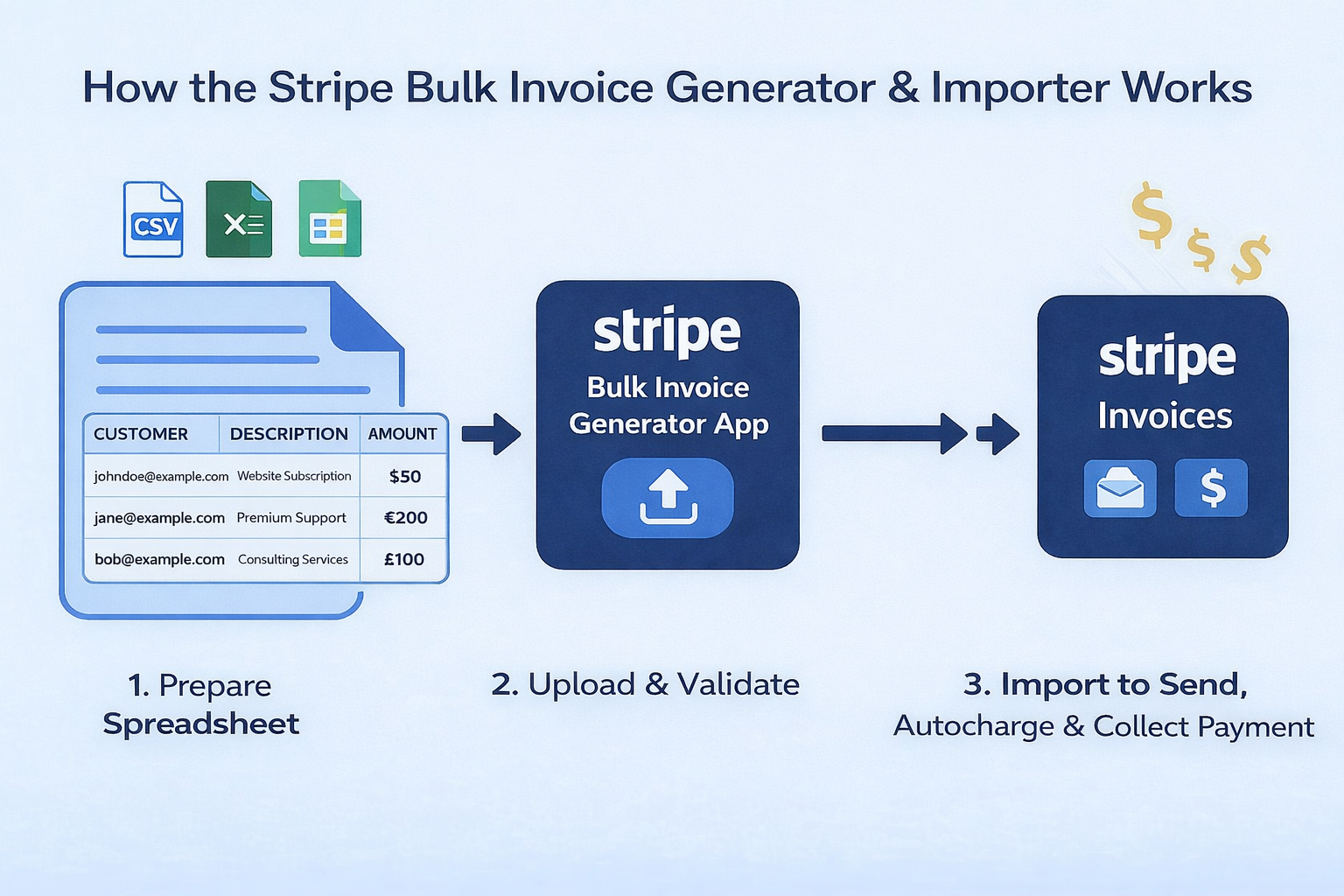
In this guide, you’ll learn how to bulk create and upload invoices to Stripe directly from your spreadsheets — CSV, Microsoft Excel, or Google Sheets — with no code, no API setup, and no developer required.
Turn your spreadsheets into Stripe invoices — instantly.
🎁 Welcome Bonus: Get a free trial with 75 credits to explore and understand how the app works. Register and get started in seconds – completely free. No setup fees. No credit card required.
Why Creating Invoices Manually in Stripe Wastes Time
Stripe’s default dashboard only allows you to add one invoice at a time — a nightmare when you’re dealing with 50, 100, or even 1,000+ invoice entries.
- ⚠️ Typos in email addresses and mismatched customer fields
- ❌ No way to set due dates, tax rates, or metadata in bulk
- ❌ No error detection — mistakes only surface after submission
- ❌ No preview to verify invoice data before it goes live
The Smarter Way: Use the Verified Stripe App
The Stripe Bulk Invoice Generator and Importer App is built for SaaS companies, agencies, freelancers, and finance teams that need to create and manage high volumes of invoices in Stripe.
How It Works:
- Install the App – Directly from the Stripe App Marketplace or visit our website.
- Register and get started in seconds – completely free. No setup fees. No credit card required.
- Download Sample File – use our pre-formatted CSV, Microsoft Excel, or Google Sheet template.
- Start Importing – upload your file, preview, and import instantly.
Key Features & Benefits
- ✅ Real-time preview and error detection before import — nothing uploads until everything is valid
- ✅ Built-in validation ensures 100% accuracy across every field
- ✅ Upload hundreds or thousands of invoices in seconds
- ✅ Full support for line items, taxes, discounts, and multiple currencies
- ✅ Add due dates, payment terms, custom fields, metadata, and memos
- ✅ Batch processing with real-time progress tracking
- ✅ No coding, no API setup, no technical expertise needed
- ✅ Direct Stripe integration (no Zapier or API required)
What Invoice Data Can You Import?
| Field | Required? | Example |
|---|---|---|
| Customer ID | ✅ Yes | cus_TiVJ1uFn0DOeJG |
| ✅ Yes | johndoe@example.com | |
| Description | ✅ Yes | A maximum of 250 line items is allowed per invoice. |
| Currency | ✅ Yes | USD, EUR, GBP, CAD, AUD, and more. |
| Amount | ✅ Yes | 19, 99, 500, and more. |
| Quantity | ✅ Yes | 1, 5, 50, 100, and more. |
| Due Date | ✅ Yes | Formatted as DD-MM-YYYY (e.g. 22-10-2026) |
| Invoice Status | ✅ Yes | draft, open, paid, uncollectible, or void |
| Auto Advance | ✅ Yes | Either true or false |
| Collection Method | ✅ Yes | Either charge_automatically or send_invoice |
| Payment Method | Optional | Example = pm_1R0YWABjlPYUJTsd1MIQWjYt or card_1RJ2VrBjlPYUJTsdUklV33eF |
| Subscription ID | Optional | sub_1Sl6LrB78xelxr7xnpbyaBLF |
| Metadata | Optional | Example = Company: John Doe Pty Ltd, Profession: Manager |
| Custom Fields | Optional | Example = Client ID: CL-10293, Project Name: CRM Migration |
| Footer Text | Optional | Footer displayed on the invoice |
Who Uses This App?
- ✅ SaaS Companies — generate recurring invoices in bulk for subscription billing
- ✅ Agencies — bill dozens or hundreds of clients at once from a single spreadsheet
- ✅ Freelancers & Consultants — create and send professional invoices without manual entry
- ✅ Course Creators & Membership Sites — invoice students and members automatically
- ✅ E-commerce & Marketplace Sellers — process high-volume invoicing effortlessly
- ✅ Accountants & Finance Teams — manage month-end invoicing and bulk billing cycles
Security First: Your Data Is Safe
- ✅ All uploads handled via Stripe’s secure infrastructure
- 🔐 Strong SSL encryption protects data in transit
- ✅ Industry-standard practices for data handling
- 💳 14-Day No-Questions-Asked Money-Back Guarantee
We take your privacy seriously. Your payment and customer information are always encrypted and secured.
Additional Benefits
- ⏳ Time-Saving & Efficient Workflow
- ✔ Simplified Data Organization
- ⚡ Minimize Errors with Validation Tools
- 🚀 Scalable Solution for Growing Teams
- ⚖ Seamless Integration with Stripe
- ⬆ Future-Proof with Ongoing Upgrades
Before vs After: Manual Entry vs Bulk Import
| Manual Dashboard | Bulk Invoice Upload | |
|---|---|---|
| 100 invoices processing time | 3–4 hours | Under 60 seconds |
| 1,000 invoices processing time | 30–40 hours (1 week) | 5 minutes |
| Error rate | High (typos, missed fields) | Near zero (pre-validated) |
| Technical skill needed | None (but painfully slow) | None (and fast) |
| Preview before creation | ❌ No — errors found after | ✅ Yes — validate before upload |
| Scalability (10,000+ invoices) | ❌ Not practical | ✅ Easy — same process |
| Multi-currency & line items | Manual entry for each | Automatic from spreadsheet |
Ready to Get Started?
- ✅ Install directly from the Stripe Marketplace — takes under 2 minutes
- ✅ Start with 75 free credits — no credit card required
- ✅ Upload your first batch of invoices today
👉 Install App on Stripe Marketplace
✅ 27K+ Installs · Verified Stripe Marketplace App · 5⭐ User Rating · Trusted by 20,000+ Businesses Globally
Frequently Asked Questions
- Q: Can I bulk create invoices with multiple line items per invoice?
- A: Yes. Each row in your spreadsheet can include line item descriptions, quantities, unit prices, and tax rates. You can create invoices with as many line items as needed.
- Q: What file formats are supported?
- A: The app supports CSV (.csv), Microsoft Excel (.xlsx), and Google Sheets. You can download a pre-formatted template from the app to get started quickly.
- Q: Can I set different due dates and payment terms for each invoice?
- A: Yes. Each row in your file can have its own due date, payment terms, and collection method (send_invoice or charge_automatically).
- Q: Does it support multi-currency invoicing?
- A: Yes. You can specify the currency for each invoice. The app supports all currencies available in your Stripe account — USD, EUR, GBP, CAD, AUD, and more.
- Q: Can I upload draft invoices and send them later?
- A: Absolutely. You can create invoices as drafts, review them in your Stripe dashboard, and finalize or send them whenever you’re ready.
- Q: How many invoices can I upload at once?
- A: There’s no hard limit. Users regularly upload hundreds to thousands of invoices in a single batch. The app handles large volumes with batch processing and real-time progress tracking.
- Q: What happens if my CSV has errors?
- A: The app shows a full preview and error report before anything is imported — nothing uploads until every record is valid. If any issues are found during processing, the app generates a downloadable CSV of only the problem records so you can fix and re-upload them.
What Our Clients Say
“This app has been a game-changer for our business. We were struggling to manually upload hundreds of invoices each month, but now everything syncs seamlessly. The process is efficient, and it has saved us hours of manual work. Highly recommended!”
— Zeyad Tolan
“The app made our invoicing process so much easier! The bulk import feature is incredibly helpful, and it integrates smoothly with our Stripe account. The ability to upload multiple invoices at once has significantly reduced our workload. The app is intuitive and works exactly as promised.”
— Aman Virdy
“I was amazed by how quickly we could integrate the Stripe Bulk Invoice Generator with our current system. The app is user-friendly and seamless, and it’s been incredibly reliable. No more tedious manual uploads! This app has streamlined our workflow and reduced the chances of human error.”
— Janine Claire Gaviola
Conclusion
Creating Stripe invoices in bulk doesn’t have to be a slow, painful process. The Stripe Bulk Invoice Generator and Importer App transforms what used to take hours of repetitive manual work into a streamlined upload that takes seconds.
Instead of creating invoices one by one in the Stripe dashboard, you simply prepare your invoice data in a spreadsheet, upload it through the app’s intuitive interface, preview everything for accuracy, and confirm the import. Whether you’re generating 50 invoices or 5,000, the process is the same — fast, validated, and error-free.
The app supports everything you need for professional invoicing: line items, taxes, discounts, multiple currencies, due dates, payment terms, custom fields, and metadata. And because it includes built-in validation and a real-time preview, you can be confident that every invoice is accurate before it reaches your customers.
No coding. No API setup. No developer required. Anyone on your team can manage high-volume invoicing from day one.
All data is processed within Stripe’s secure environment with strong SSL encryption, so your customer information stays protected throughout.
Ready to eliminate manual invoice creation? Start today with 75 free credits — no credit card required. Your billing workflow is about to get a whole lot faster.


