


Introduction
Are you tired of manually exporting Stripe customers and importing them into Mailchimp one by one?
If you’re running a business on Stripe, your customer list grows every day. But keeping that data synchronized with your Mailchimp audience manually is a nightmare — CSV exports, data mismatches, missed new customers, outdated email lists, and hours of repetitive work.
In this guide, you’ll learn how to automatically sync your Stripe customers to Mailchimp — in bulk and in real time, directly from your Stripe Dashboard, with no manual data entry, no CSV exports, and no coding required.
Turn your Stripe customer data into a perfectly synchronized Mailchimp audience — instantly and automatically.
Why Manually Syncing Stripe Customers to Mailchimp Wastes Time
Stripe and Mailchimp don’t automatically talk to each other — leaving businesses stuck with manual, error-prone data transfer processes that slow down marketing operations and cause costly mistakes.
- ⚠️ No native Stripe to Mailchimp sync — manual export and import every time
- ❌ New Stripe customers don’t automatically appear in Mailchimp
- ❌ Customer updates in Stripe are never reflected in Mailchimp automatically
- ❌ CSV exports are error-prone, outdated the moment they’re created
- ❌ Missing customers means missed email campaigns and lost revenue
- ❌ Manual data entry takes hours every week with no guarantee of accuracy
The Smarter Way: Use Stripe Customer Sync for Mailchimp
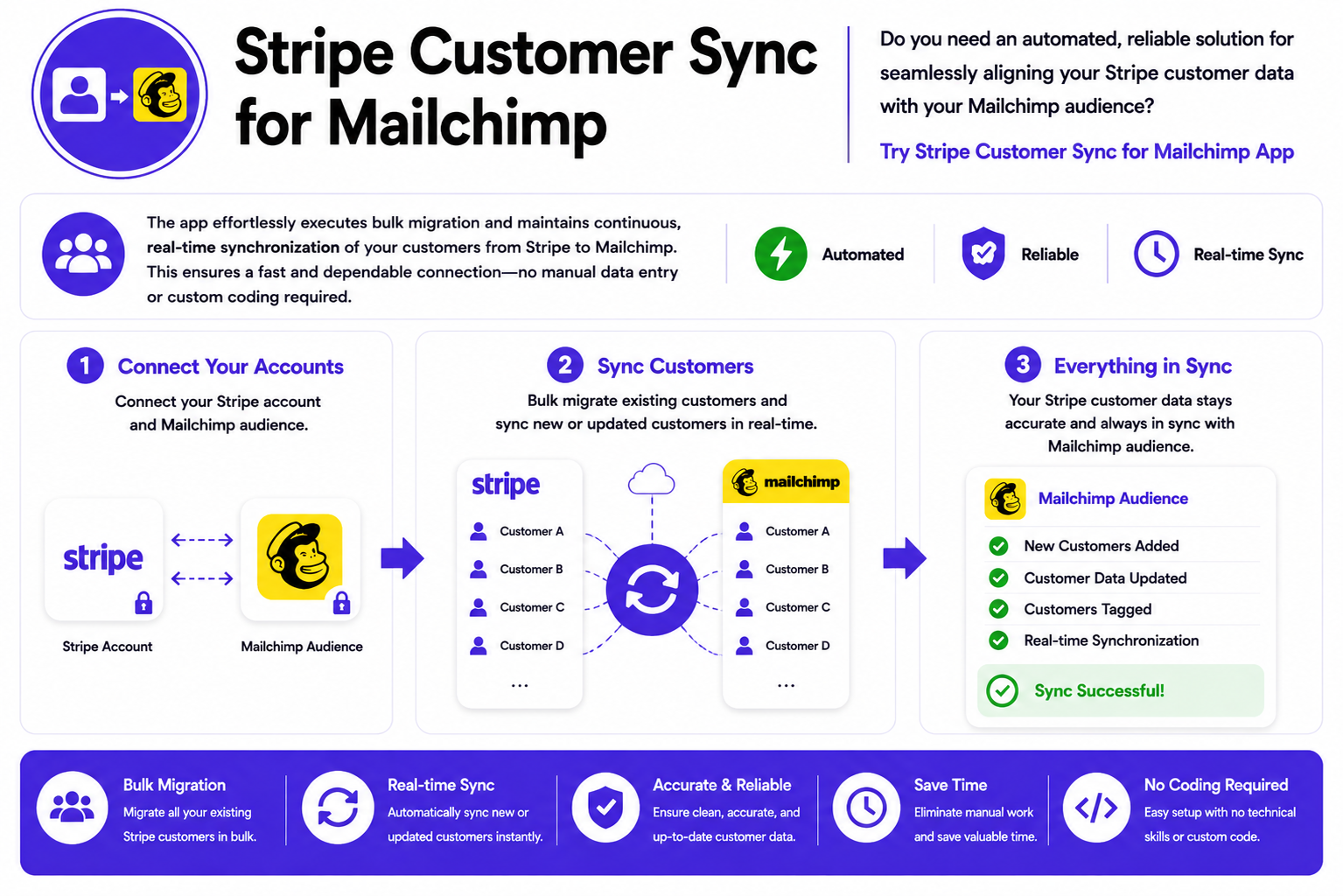
Stripe Customer Sync for Mailchimp is built for businesses, marketers, and e-commerce teams that need their Stripe customer data perfectly synchronized with Mailchimp — automatically, reliably, and without leaving the Stripe Dashboard.
How It Works:
- Install the App – Directly from the Stripe App Marketplace or visit our website.
- Connect Your Mailchimp Account – Click the connect button and authorize your Mailchimp account in seconds.
- Select Your Mailchimp List – Choose which Mailchimp audience to sync your Stripe customers to.
- Add Tags (Optional) – Add comma-separated tags to organize your synced customers in Mailchimp.
- Enable Auto-Sync – Turn on real-time auto-sync to automatically keep new and updated customers synchronized continuously.
- Bulk Migrate Existing Customers – Use the in-app bulk migration tool to sync all your existing Stripe customers to Mailchimp at once.
Key Features & Benefits
⚡ Speed & Efficiency
- ✅ Bulk migration — sync all existing Stripe customers to Mailchimp in one go
- ✅ Real-time auto-sync — new customers and updates sync automatically as they happen
- ✅ Save hours weekly — eliminate manual CSV exports and imports forever
- ✅ Set it once — configure once and the app handles everything automatically
🛡️ Accuracy & Reliability
- ✅ 100% accurate data — directly from Stripe’s official API to Mailchimp
- ✅ No missed customers — every new Stripe customer is automatically added to Mailchimp
- ✅ Real-time updates — customer changes in Stripe are reflected in Mailchimp instantly
- ✅ No data mismatches — eliminates CSV import errors and outdated contact lists
🔧 Flexibility & Power
- ✅ Mailchimp list selection — choose exactly which audience to sync customers to
- ✅ Custom tags support — add comma-separated tags to organize synced customers
- ✅ Auto-sync toggle — enable or disable real-time sync anytime
- ✅ Bulk migration tool — migrate all existing customers in one batch directly from Stripe Dashboard
👨💻 Ease of Use (No Technical Skills Required)
- ✅ No coding required — simple point-and-click setup inside Stripe Dashboard
- ✅ Setup in under 2 minutes — connect, configure, and start syncing immediately
- ✅ No CSV exports — direct API connection between Stripe and Mailchimp
- ✅ No custom coding — fully managed integration with zero technical knowledge needed
Sync Features Available
📦 Bulk Customer Migration
Migrate all your existing Stripe customers to your Mailchimp audience in one go. The bulk migration process runs entirely inside the app within your Stripe Dashboard — no CSV exports, no copy-pasting, no manual data entry. Every customer is synced accurately and completely.
🔄 Real-Time Auto-Sync
Enable auto-sync once and the app automatically adds every new Stripe customer to your Mailchimp audience in real time. When customer details update in Stripe, Mailchimp is updated too — continuously and automatically, without any manual intervention.
📋 Mailchimp List Selection
Choose exactly which Mailchimp audience your Stripe customers are synced to. Whether you have one list or multiple audiences for different segments, you control where each customer lands.
🏷️ Custom Tags
Add custom comma-separated tags when syncing customers to Mailchimp. Organize your audience by customer type, product, region, or any other criteria — making segmentation and targeted campaigns effortless.
Who Uses Stripe Customer Sync for Mailchimp?
- ✅ E-commerce Stores — automatically add every Stripe buyer to Mailchimp for follow-up campaigns
- ✅ SaaS Companies — sync subscription customers to Mailchimp for onboarding and retention emails
- ✅ Marketing Teams — keep Mailchimp audiences perfectly up to date without manual work
- ✅ Agencies — manage Stripe to Mailchimp sync for multiple clients effortlessly
- ✅ Freelancers — sync client payment data to Mailchimp for follow-up communications
- ✅ Membership Sites — automatically add members to Mailchimp when they pay via Stripe
- ✅ Online Educators — sync course buyers to Mailchimp for drip email campaigns
- ✅ Nonprofits — sync Stripe donors to Mailchimp for donor communications and campaigns
Security First: Your Data Is Safe
- ✅ Secure OAuth authentication — industry-standard Mailchimp authorization flow
- 🔐 Strong SSL encryption — all data transfers are encrypted end to end
- ✅ Official Stripe API — built on Stripe’s trusted and verified infrastructure
- ✅ Verified Stripe Marketplace App — reviewed and approved by Stripe
We take your privacy seriously. Your customer and payment information are always encrypted and secured using industry best practices.
Before vs After: Manual Sync vs Automated Sync
| Action | Manual Stripe to Mailchimp Sync | Stripe Customer Sync for Mailchimp |
|---|---|---|
| Add new Stripe customer to Mailchimp | Manual export + import every time | Automatic in real time |
| Migrate existing customers | CSV export, clean data, import — hours of work | One-click bulk migration in minutes |
| Keep Mailchimp up to date | Repeat export/import process regularly | Auto-sync keeps it updated continuously |
| Customer data accuracy | Errors from manual entry and outdated CSVs | 100% accurate via direct API connection |
| Organize customers with tags | Manual tagging in Mailchimp after import | Tags applied automatically during sync |
| Technical skill needed | Moderate (CSV management, data cleaning) | None — set up in under 2 minutes |
| Time investment | Hours per week of repetitive manual work | Zero — fully automated after setup |
| Scalability | Breaks down at high customer volumes | Handles unlimited customers effortlessly |
Real-World Use Cases
🛍️ Use Case 1: E-commerce Post-Purchase Email Campaigns
Challenge: Online store processes payments via Stripe but struggles to add every new buyer to Mailchimp for post-purchase follow-up emails. Manual CSV exports are done weekly, meaning new customers miss the first few days of email campaigns.
Solution: Enable real-time auto-sync so every new Stripe customer is instantly added to Mailchimp the moment they complete a purchase.
Result: 100% of new customers receive post-purchase emails immediately. Revenue from email follow-ups increased significantly.
🚀 Use Case 2: SaaS Onboarding Email Sequence
Challenge: SaaS company needs every new subscriber added to Mailchimp within minutes to trigger their onboarding email sequence. Manual syncing causes delays of hours or days, resulting in poor onboarding experiences.
Solution: Real-time auto-sync ensures every new Stripe subscriber is instantly added to the Mailchimp onboarding audience and triggers the email sequence immediately.
Result: Onboarding email sequence triggers within seconds of signup. Customer activation rates improved dramatically.
📧 Use Case 3: Migrating Thousands of Existing Customers
Challenge: Business has 5,000 existing Stripe customers that have never been synced to Mailchimp. Manual CSV export, data cleaning, and import would take a full day of work with high risk of errors.
Solution: Use the bulk migration tool to sync all 5,000 existing Stripe customers to Mailchimp in one batch directly from the Stripe Dashboard.
Result: All 5,000 customers migrated accurately in minutes. Zero manual work, zero errors.
🎓 Use Case 4: Online Course Student Email Management
Challenge: Online educator sells courses via Stripe and needs every student added to the correct Mailchimp audience with specific tags (course name, enrollment date) for drip email campaigns.
Solution: Configure auto-sync with custom tags matching the course name. Every new course buyer is automatically added to Mailchimp with the correct tag applied.
Result: Course-specific drip email campaigns trigger automatically for every new student. Educator saves 5 hours per week of manual list management.
Ready to Get Started?
- ✅ Install directly from Stripe Marketplace — takes under 2 minutes
- ✅ Connect your Mailchimp account — one-click OAuth authorization
- ✅ Start syncing your customers today — bulk migrate and enable auto-sync immediately
✅ Trusted by businesses globally · Verified Stripe Marketplace App · 5⭐ User Rating
Frequently Asked Questions
- Q: Does the app sync existing Stripe customers to Mailchimp?
- A: Yes. The bulk migration tool syncs all your existing Stripe customers to your selected Mailchimp audience in one batch. The migration runs inside the app within your Stripe Dashboard — no CSV exports required.
- Q: How does real-time auto-sync work?
- A: Once you enable auto-sync, the app automatically adds every new Stripe customer to your Mailchimp audience in real time as they are created. Customer updates in Stripe are also reflected in Mailchimp continuously and automatically.
- Q: Can I add tags to synced customers in Mailchimp?
- A: Yes. You can add comma-separated tags during configuration. These tags are automatically applied to every customer synced to Mailchimp, making audience segmentation and targeted campaigns easy.
- Q: Which Mailchimp audience does it sync to?
- A: You select exactly which Mailchimp audience (list) your Stripe customers are synced to during setup. You can change this anytime from the app settings.
- Q: Do I need technical skills to set up the sync?
- A: No. The app works inside your Stripe Dashboard with a simple point-and-click setup. Connect your Mailchimp account, select your audience, and enable auto-sync — no coding or technical expertise required.
- Q: Does this work with multiple Mailchimp lists?
- A: Yes. You can select any of your existing Mailchimp audiences to sync to. If you manage multiple lists, simply choose the correct one during configuration.
- Q: What customer data is synced to Mailchimp?
- A: The app syncs customer name, email address, and phone number. All data is transferred directly via the official Stripe and Mailchimp APIs for maximum accuracy.
- Q: Does this work with Stripe test mode?
- A: Yes. The app works in both Stripe live mode and test mode, making it easy to test the sync before going live with real customer data.
- Q: What happens when a Stripe customer’s details are updated?
- A: With auto-sync enabled, any updates to a customer’s details in Stripe are automatically reflected in your Mailchimp audience in real time — keeping your email list always accurate and up to date.
- Q: Is the Mailchimp connection secure?
- A: Yes. The app uses Mailchimp’s official OAuth authorization flow — the same secure standard used by all major Mailchimp integrations. Your credentials are never stored by the app.
What Our Clients Say
This app is exactly what we needed to integrate our Stripe customers with our Mailchimp account. It’s simple to set up, and now we can automatically sync all customer data with just a click.
— Felicity Sauncho
I’m impressed with how quickly and efficiently the Sync Stripe Customers app works. It’s helped us streamline our customer outreach efforts and keep our data organized across platforms.
— Noemi Lomax
As a growing business, managing customer data was becoming overwhelming. This app has made syncing our Stripe customers to Mailchimp effortless. Highly recommend!
— Yong Lundstrom
Conclusion
Manually exporting Stripe customers to CSV and importing them into Mailchimp doesn’t have to be part of your workflow anymore. Stripe Customer Sync for Mailchimp transforms what used to take hours of repetitive manual work into a fully automated sync that runs continuously — without any intervention from you.
Instead of regularly exporting CSVs, cleaning data, and importing it into Mailchimp — only to find it’s already outdated — you simply connect your accounts once and let the app handle everything automatically. Every new Stripe customer is instantly added to Mailchimp. Every update is reflected in real time. And all your existing customers can be bulk migrated in minutes.
Whether you have 100 customers or 100,000, the sync is the same — effortless, accurate, and continuous. E-commerce stores trigger post-purchase campaigns immediately. SaaS companies onboard new subscribers instantly. Marketing teams always have a perfectly up-to-date Mailchimp audience. Everyone gets the accurate customer data they need without the manual work.
The app supports everything you need: bulk migration, real-time auto-sync, Mailchimp list selection, and custom tag support. And because it’s built on both Stripe’s and Mailchimp’s official APIs and verified by Stripe Marketplace, your data is always secure.
No coding. No CSV exports. No manual importing. No technical expertise required. Anyone on your team can connect Stripe to Mailchimp in under 2 minutes.
Ready to stop manually syncing your Stripe customers to Mailchimp?
Get started with Stripe Customer Sync for Mailchimp now and experience effortless, real-time customer synchronization.


